

In today’s interconnected digital landscape, robust network security and meticulous policy management are no longer optional but imperative. As businesses increasingly rely on technology for operations, data exchange, and communication, their networks and servers become prime targets for sophisticated cyber threats. This elevated risk necessitates powerful tools for controlling and monitoring network access. Microsoft’s Network Policy Server (NPS) stands out as a critical component in this defense strategy, offering a comprehensive solution for centralized authentication, authorization, and accounting (AAA).
At its core, NPS is Microsoft’s implementation of a Remote Authentication Dial-In User Service (RADIUS) server and proxy within Windows Server operating systems. This versatile tool empowers network administrators to define and enforce granular policies that govern who and what can access network resources, thereby bolstering security and streamlining management. Understanding NPS requires a foundational grasp of the RADIUS protocol, its AAA framework, and how NPS leverages these principles to enhance network control.
The Imperative of Network Security and Policy Management
The digital transformation has placed networks and servers at the forefront of business operations. This reliance, however, amplifies vulnerability. Cybercriminals continuously evolve their tactics, making proactive security measures and stringent policy enforcement paramount.
The importance of network security and policy management can be distilled into several key areas:
- Protection Against Unauthorized Access: Preventing malicious actors or unauthorized personnel from gaining entry into sensitive networks and systems.
- Data Integrity and Confidentiality: Ensuring that data remains accurate, complete, and accessible only to authorized individuals, safeguarding against breaches and leaks.
- Compliance and Regulatory Adherence: Meeting the stringent requirements of industry-specific regulations (e.g., HIPAA, GDPR, PCI DSS) that mandate secure data handling and access controls.
- Operational Continuity: Minimizing downtime and disruption caused by security incidents, ensuring that business operations can continue uninterrupted.
- Resource Optimization: Managing network resources effectively by controlling access and usage, preventing overuse or misuse.
- Auditing and Accountability: Maintaining detailed logs of network access and user activities for forensic analysis, troubleshooting, and accountability.
Understanding the RADIUS Protocol: The Foundation of Network Access Control
The Remote Authentication Dial-In User Service (RADIUS) protocol, first introduced in 1991, is a de facto standard for managing network access control. It provides a centralized framework for Authentication, Authorization, and Accounting (AAA) for users connecting to network services. This protocol operates on a client-server model, enabling a single point of control for network access policies across potentially thousands of network access devices.
Authentication: Verifying Identity
The first "A" in AAA, Authentication, is the process of verifying a user’s identity. When a user or device attempts to connect to a network resource (e.g., a VPN, Wi-Fi access point), they are prompted to provide credentials. These typically include a username and password, but can also involve certificates or multi-factor authentication methods. The RADIUS client, often the network access server itself, forwards these credentials to the RADIUS server. The RADIUS server then consults its user database and security policies to confirm the identity of the requesting entity. Successful authentication is the gateway to further network access.
Authorization: Defining Access Rights
Once a user’s identity is confirmed through authentication, the RADIUS server moves to Authorization. This phase determines what specific resources or services the authenticated user is permitted to access and what actions they can perform. For instance, a standard employee might be authorized to access internal file shares and email, while an IT administrator could have broader permissions, including access to server management consoles. RADIUS facilitates the creation of profiles that dictate these access privileges, ensuring that users only interact with network components relevant to their roles and responsibilities. This granular control is vital for maintaining operational security and preventing the lateral movement of threats within a network.
Accounting: Tracking Network Usage
The final component of AAA is Accounting, which involves meticulously tracking and recording user activity on the network. This includes data such as connection times, duration of sessions, data transferred, and services accessed. The RADIUS server sends accounting information back to the RADIUS client, which then logs this data. This accounting information is invaluable for a variety of purposes, including:
- Billing: For organizations that charge for network usage (e.g., internet service providers, managed service providers).
- Auditing: To verify that access policies are being followed and to investigate security incidents.
- Capacity Planning: To understand network usage patterns and forecast future resource needs.
- Troubleshooting: To identify the source of network issues or performance bottlenecks.
The Functionality of RADIUS Servers
RADIUS operates within a client-server architecture. A RADIUS client, typically a network access server (NAS) such as a wireless access point, VPN concentrator, or dial-up server, initiates the process by sending user credentials and connection requests to the RADIUS server. The RADIUS server, in turn, processes these requests, referencing its user database and configured policies. It then communicates back to the client, either granting or denying access based on the authentication and authorization decisions.
Key features commonly associated with RADIUS servers include:
- Centralized AAA Management: Consolidating user authentication, authorization, and accounting for all network access points.
- Protocol Support: Primarily using RADIUS protocol over UDP.
- User Database Integration: Ability to connect with various user directories like Active Directory, LDAP, or local databases.
- Policy Engine: A sophisticated system for defining granular access rules based on user attributes, network conditions, and other factors.
- Extensibility: Support for various authentication methods, including PAP, CHAP, EAP, and PEAP.
- Logging and Auditing: Comprehensive logging capabilities for tracking all access events.
The Purpose and Role of Network Policy Server (NPS)
Microsoft’s Network Policy Server (NPS) extends these RADIUS capabilities, acting as a robust and scalable solution for network access control within Windows Server environments. Its primary purpose is to provide centralized AAA management, significantly enhancing network security and operational efficiency for organizations. NPS allows administrators to define precise rules that govern how users and devices connect to network resources, ensuring that only legitimate and authorized entities gain access.

Centralized Authentication and Authorization: The First Line of Defense
NPS excels at consolidating the authentication and authorization processes. By centralizing these functions, it ensures that every attempt to access the network is verified against a unified set of policies.
- Streamlined Authentication: NPS integrates seamlessly with Active Directory, allowing administrators to leverage existing user accounts and groups for authentication. This eliminates the need for separate user databases and simplifies credential management.
- Granular Authorization: NPS enables the creation of detailed network policies that specify what authenticated users and devices are allowed to do. These policies can be based on a wide range of conditions, including user group membership, time of day, location, device health status, and the type of connection. This level of control is critical for segmenting networks, enforcing least privilege principles, and preventing unauthorized access to sensitive data.
Accounting and Compliance: Ensuring Accountability and Adherence
The accounting capabilities of NPS are crucial for auditing, compliance, and understanding network usage. By meticulously logging all network access events, NPS provides a clear audit trail.
- Detailed Logging: NPS records connection attempts, successful and failed logins, session durations, and data transfer volumes. This information is vital for forensic investigations following a security incident, performance monitoring, and capacity planning.
- Regulatory Compliance: Many industry regulations require organizations to maintain detailed logs of access to sensitive data. NPS helps meet these compliance mandates by providing the necessary audit trails for user activity. This is particularly important for sectors like healthcare (HIPAA), finance (PCI DSS), and those handling personal data (GDPR). For instance, a healthcare organization can use NPS logs to demonstrate that only authorized medical personnel accessed patient records within specified timeframes, thus adhering to HIPAA’s strict privacy and security rules.
Policy-Based Network Management: Tailoring Network Access
NPS empowers administrators with policy-based network management, offering unparalleled control over network access. This feature allows for the creation of dynamic and context-aware access rules that adapt to changing security needs and operational requirements.
- Customizable Policies: Administrators can define conditions and constraints that must be met for network access to be granted. This can include specifying which wireless networks a user can connect to, what VPN gateways they can use, or even restricting access based on the health of their device.
- Dynamic Access Control: Policies can be configured to change access rights based on factors like time of day, day of the week, or user group membership. For example, access to certain sensitive resources might be restricted outside of standard business hours, or temporary access might be granted to contractors for specific projects.
- Integration with Network Access Protection (NAP): While NAP is being deprecated, historically, NPS integrated with Microsoft’s Network Access Protection (NAP) to enforce client health policies. This ensured that only compliant and healthy devices could connect to the network, thereby preventing malware or compromised systems from infecting the network.
The Multifaceted Benefits of Implementing NPS
The adoption of NPS within an organization’s network infrastructure yields a significant array of advantages, enhancing both security posture and operational efficiency.
- Enhanced Security: By centralizing authentication and enforcing granular policies, NPS acts as a robust barrier against unauthorized access, significantly reducing the attack surface.
- Improved Network Performance: Efficient management of access and resource allocation can prevent network congestion and optimize performance.
- Simplified Administration: Centralized management of network access policies reduces the complexity of managing distributed access control systems, saving IT staff time and resources.
- Scalability: NPS can handle a large volume of connection requests, making it suitable for organizations of all sizes, from small businesses to large enterprises.
- Cost-Effectiveness: As a built-in component of Windows Server, NPS offers a cost-effective solution compared to third-party AAA systems, especially for organizations already invested in the Microsoft ecosystem.
- Compliance Assistance: The comprehensive logging and auditing capabilities of NPS directly support efforts to meet regulatory compliance requirements.
- Flexibility: NPS supports various authentication methods and can be integrated with different network access devices, offering considerable flexibility in network design and implementation.
- Centralized Auditing: Provides a single point for reviewing network access logs, simplifying the process of identifying and responding to security events.
- Reduced Risk of Misconfigurations: Centralizing policy management minimizes the risk of inconsistent or conflicting access rules across different network segments.
The Three Pivotal Roles of NPS
NPS functions in three distinct yet interconnected roles, each contributing to its comprehensive network management capabilities.
1. NPS as a RADIUS Server
In its primary role, NPS acts as a RADIUS server. It receives connection requests from network access servers, processes these requests by verifying credentials and evaluating network policies, and then sends back a response to grant or deny access. This is the most common deployment scenario, where NPS directly manages the AAA process for network connections. Whether it’s securing Wi-Fi access for employees and guests, controlling VPN connections for remote workers, or managing dial-up access for legacy systems, NPS as a RADIUS server ensures that only authenticated and authorized users can connect. Its ability to work with Active Directory for user authentication simplifies the management of user credentials, ensuring that access is always aligned with the organization’s user directory.
2. NPS as a RADIUS Proxy
In larger or more complex network environments, NPS can be configured to act as a RADIUS proxy. In this capacity, NPS does not directly process authentication requests but rather forwards them to other RADIUS servers located in different network segments or even in different geographical locations. This role is invaluable for:
- Distributed Networks: Allowing a central point of policy management while directing authentication requests to regional RADIUS servers.
- Load Balancing: Distributing connection requests across multiple RADIUS servers to prevent any single server from becoming a bottleneck and to improve overall performance and availability.
- Failover: If a primary RADIUS server becomes unavailable, the proxy can redirect requests to a secondary server, ensuring continuous network access.
- Policy Consolidation: While requests are forwarded, the proxy can still enforce certain overarching policies or filter requests before they reach the backend RADIUS servers, providing an additional layer of control.
3. NPS as a Network Policy Server
This role is intrinsic to NPS’s function and refers to its core capability of defining and enforcing network policies. It’s not just about authenticating users; it’s about dictating the terms of their access. NPS acts as the central policy engine, allowing administrators to create intricate rules that govern network connectivity.
- Conditions and Constraints: Policies are built upon conditions (e.g., user is a member of the "Sales" group, connection is via Wi-Fi) and constraints (e.g., grant access, deny access, request further authentication).
- Connection Request Policies: These policies determine how NPS processes incoming connection requests, including whether to process them locally or forward them to another RADIUS server.
- Network Policies: These are the policies that define the actual authentication, authorization, and accounting parameters for connections that NPS processes. They allow for highly specific configurations, such as granting access to a specific wireless SSID only during business hours, or restricting VPN access to users with up-to-date antivirus software.
Best Practices for Deploying and Managing NPS
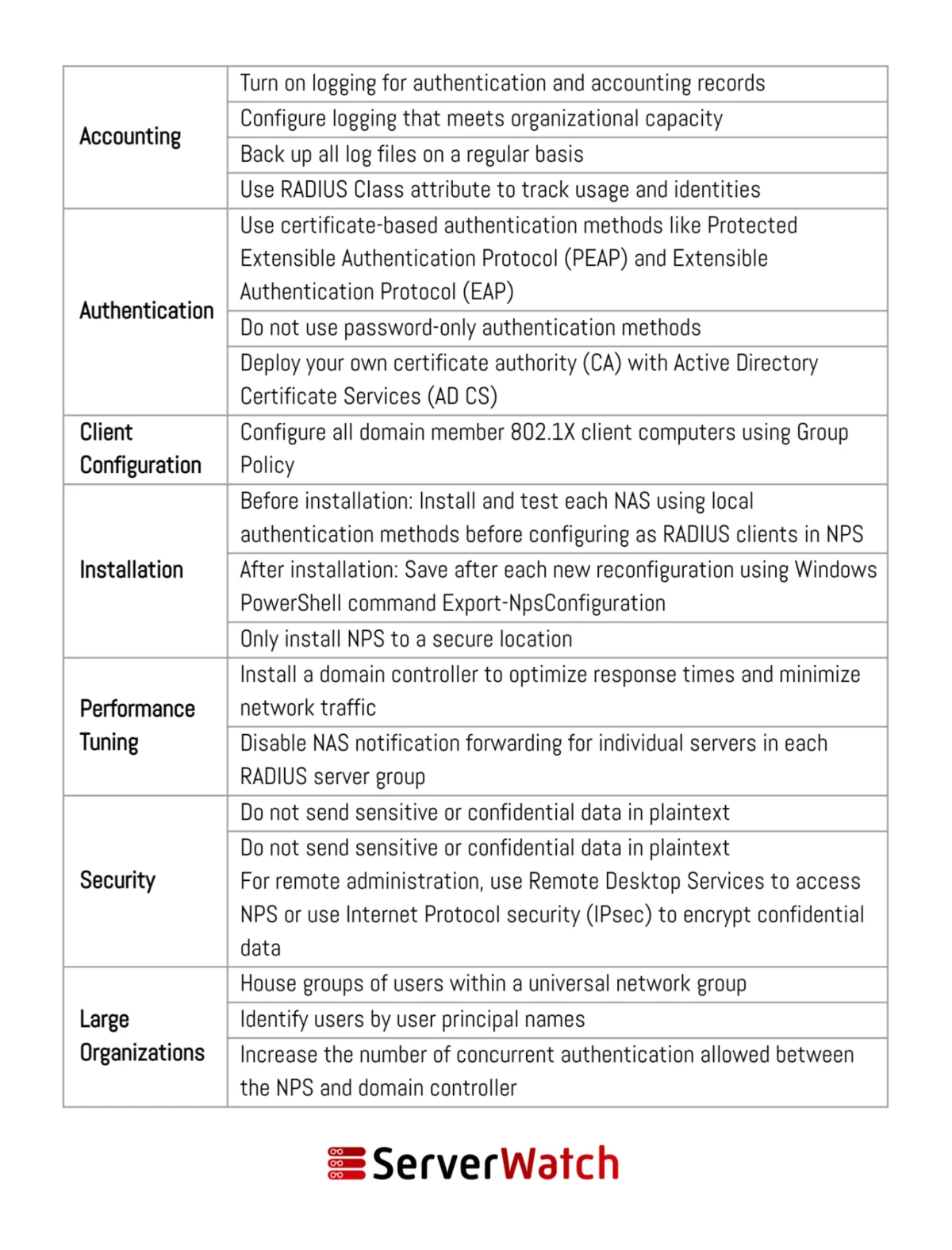
To maximize the effectiveness and security of NPS, adherence to established best practices is crucial. These recommendations, often provided by Microsoft and cybersecurity experts, ensure that NPS operates efficiently and reliably.
- Secure NPS Server Installation: Install NPS on a dedicated server rather than a domain controller to isolate its functions and minimize the impact of a potential compromise. Ensure the server is hardened, regularly patched, and protected by firewalls.
- Strong Authentication Methods: Implement strong authentication protocols like PEAP (Protected Extensible Authentication Protocol) or EAP-TLS, which utilize certificates for enhanced security over less secure methods like PAP.
- Principle of Least Privilege: Configure NPS policies to grant users and devices only the minimum necessary access required to perform their functions. Avoid overly broad permissions.
- Regular Policy Review and Updates: Network access needs evolve. Regularly review and update NPS policies to reflect changes in organizational structure, security threats, and business requirements. Remove outdated or unnecessary policies.
- Comprehensive Logging and Monitoring: Enable detailed logging for both connection request policies and network policies. Regularly review these logs for suspicious activity, failed connection attempts, and policy violations. Implement a centralized logging solution for easier analysis and retention.
- Use RADIUS Proxy for Scalability and Resilience: In larger environments, leverage the RADIUS proxy functionality of NPS to distribute load and provide failover capabilities.
- Secure Communication Channels: Ensure that communication between NPS servers and network access devices is secured, typically through IPsec or by configuring RADIUS shared secrets securely.
- Segment Network Access: Use NPS policies to segment network access based on user roles, device types, or network zones (e.g., guest Wi-Fi vs. corporate Wi-Fi).
- Test Policies Thoroughly: Before deploying new or modified policies to production, test them in a controlled environment or a pilot group to ensure they function as expected and do not inadvertently block legitimate access.
- Integrate with Active Directory Security Groups: Leverage Active Directory groups to manage user access. This simplifies policy management by allowing administrators to add or remove users from groups rather than modifying individual NPS policies.
- Regular Backups: Ensure that NPS configurations and policies are regularly backed up. This is critical for disaster recovery and quick restoration in case of server failure or accidental deletion.
The Integral Role of NPS in Modern Network Management
In conclusion, Microsoft’s Network Policy Server (NPS) is an indispensable tool for modern network management. It provides a powerful, flexible, and scalable solution for enforcing secure network access policies, significantly enhancing an organization’s security posture and operational efficiency. By centralizing authentication, authorization, and accounting, NPS offers granular control over who and what can access network resources, thereby mitigating risks associated with unauthorized access and data breaches.
The seamless integration of NPS with Active Directory, its robust policy engine, and its ability to function as both a RADIUS server and proxy make it a cornerstone of secure network infrastructure. Organizations that meticulously implement and manage NPS, adhering to best practices, can significantly bolster their defenses against evolving cyber threats, ensure compliance with regulatory mandates, and streamline the administrative burden of network access control. As networks become more complex and the threat landscape more dynamic, the role of NPS in maintaining a secure and well-managed network environment will only continue to grow in importance.
To further optimize NPS functionality and performance, consider exploring advanced RADIUS server testing and monitoring tools, which can provide critical insights into the health and efficiency of your network access control system.
