
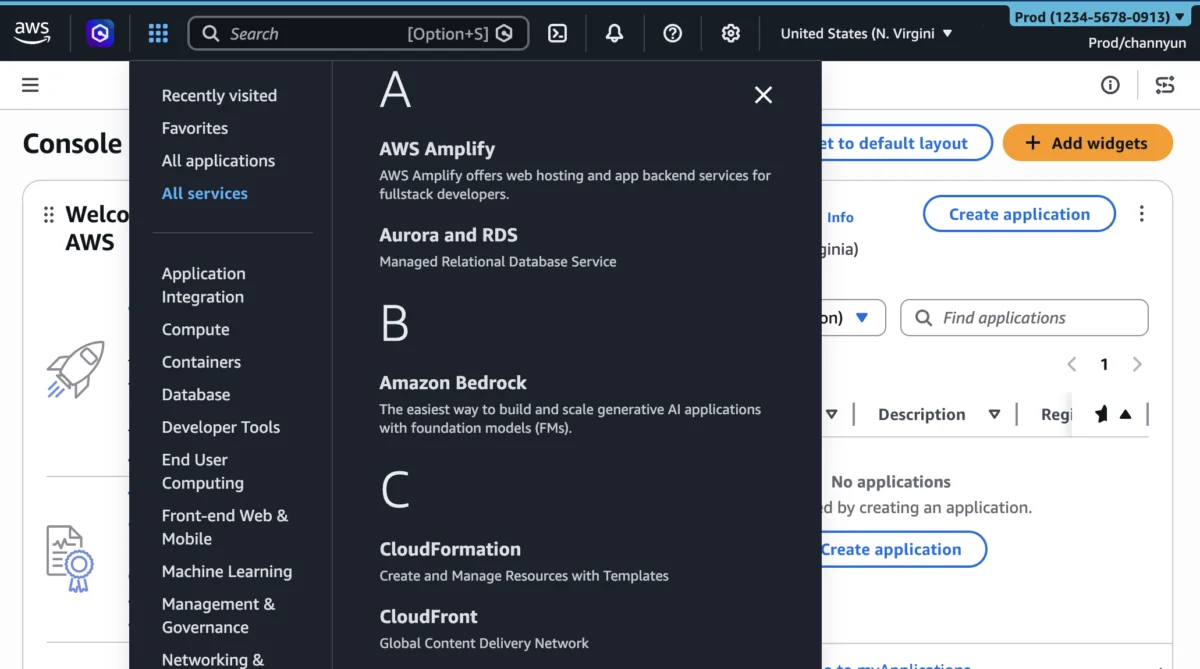

Amazon Web Services (AWS) today announced significant enhancements to its User Experience Customization (UXC) capability within the AWS Management Console, empowering administrators to selectively display relevant AWS Regions and services for their teams. This expansion builds upon the initial UXC launch in August 2025, which introduced the ability to assign distinct colors to AWS accounts for easier identification. The new features aim to drastically reduce cognitive load, minimize unnecessary clicks and scrolling, and ultimately boost productivity for cloud professionals navigating the increasingly vast and complex AWS ecosystem.
The Evolving AWS Landscape and the Imperative for Simplification
The AWS cloud has grown exponentially since its inception, now offering over 200 fully featured services and operating across dozens of global Regions. While this extensive portfolio provides unparalleled flexibility and power, it also presents a significant challenge: information overload. For many users, particularly those working within large organizations with specific mandates or limited service requirements, the sheer volume of available options in the AWS Management Console can be overwhelming. This complexity can lead to longer task completion times, increased training overhead for new hires, and even potential misconfigurations if users inadvertently select incorrect Regions or services.
Recognizing this challenge, AWS has steadily invested in improving the user experience of its console. The introduction of AWS User Experience Customization (UXC) in August 2025 marked a crucial step in this direction. Initially, UXC allowed account administrators to assign unique colors to AWS accounts. This seemingly simple feature provided a powerful visual cue, enabling users to instantly differentiate between environments—for instance, using green for development, blue for testing, and red for production accounts. This initial capability addressed a fundamental need for visual organization in multi-account strategies, a common practice for enterprises leveraging AWS Organizations for governance and billing.
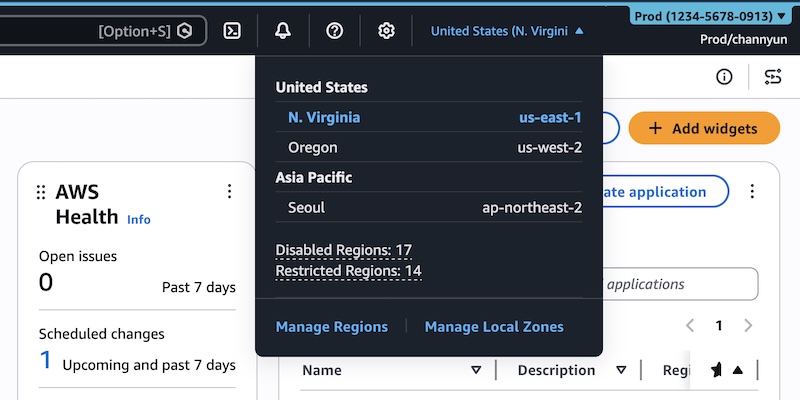
Today’s announcement represents a substantial evolution of the UXC framework, moving beyond visual cues to offer deeper functional customization. By enabling the selective display of Regions and services, AWS is directly addressing the need for a more personalized and context-aware management experience. This enhancement is particularly critical for large enterprises, regulated industries, and teams operating under strict architectural guidelines, where only a subset of AWS’s global infrastructure and service offerings are relevant to their daily operations.
Deep Dive into New Capabilities: Tailored Console Experience
The core of the new UXC enhancements lies in two pivotal capabilities: customized Region visibility and customized service visibility. These features, combined with the existing account coloring option, provide a comprehensive suite for creating a highly focused and efficient AWS Management Console environment.
Reducing Cognitive Load and Enhancing Focus

One of the primary benefits of these new customization options is the reduction of cognitive load. In complex user interfaces, the presence of irrelevant information or options can distract users, slow down decision-making, and increase the likelihood of errors. By hiding unused Regions and services, administrators can curate a console view that presents only the tools and geographical deployments pertinent to a specific team or individual’s role.
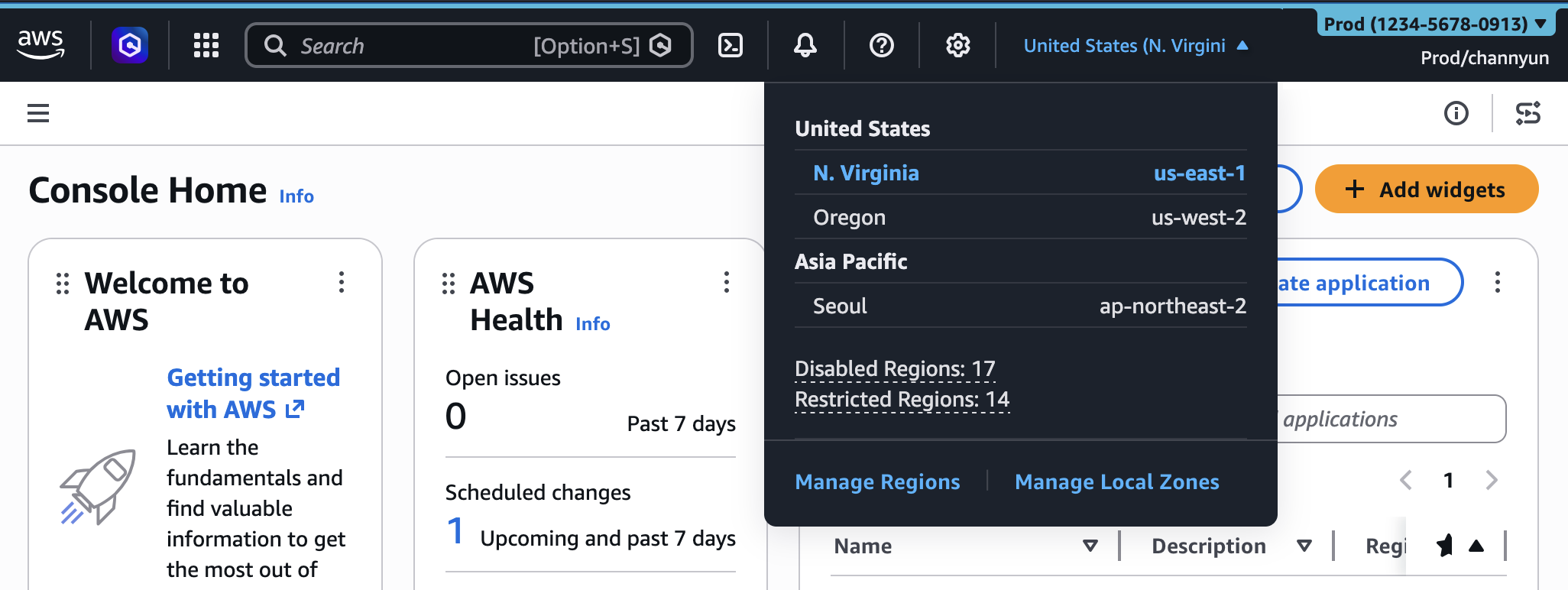
For instance, a development team focused solely on applications deployed in us-east-1 and eu-west-1 no longer needs to scroll through a list of dozens of global Regions every time they switch environments. Similarly, a database administrator who primarily interacts with Amazon RDS and DynamoDB will no longer see a vast array of machine learning, analytics, or media services in their "All services" menu. This streamlined interface helps users focus better on their tasks, leading to faster navigation, quicker task completion, and an overall more pleasant and less error-prone experience. Studies on human-computer interaction consistently demonstrate that simplified interfaces, tailored to user needs, significantly improve efficiency and user satisfaction.
Categorizing Accounts Visually with Color
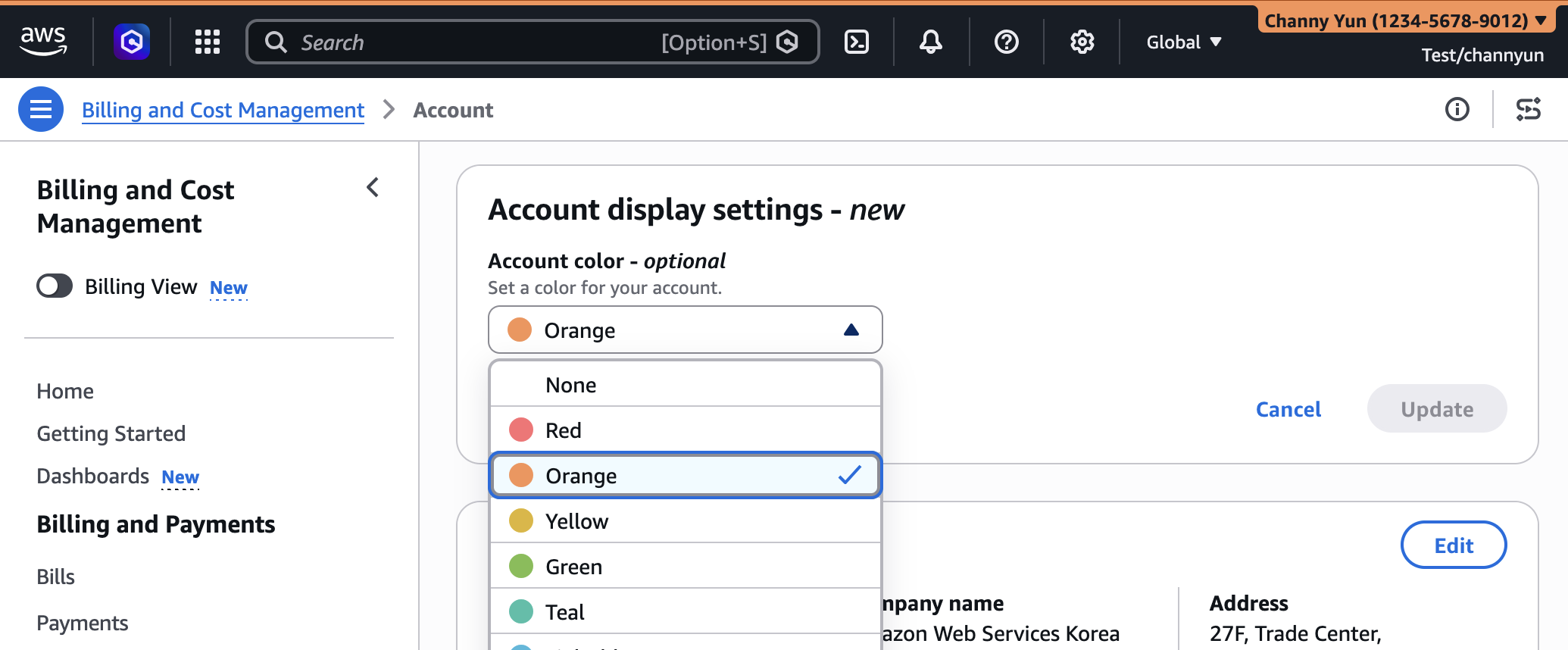
The account coloring feature, first introduced in August 2025, remains a cornerstone of UXC. Administrators can assign a specific color to each AWS account, which then appears prominently in the console’s navigation bar. This visual distinction is invaluable in multi-account architectures, where teams often manage numerous AWS accounts for different purposes (e.g., development, testing, staging, production, security, shared services).
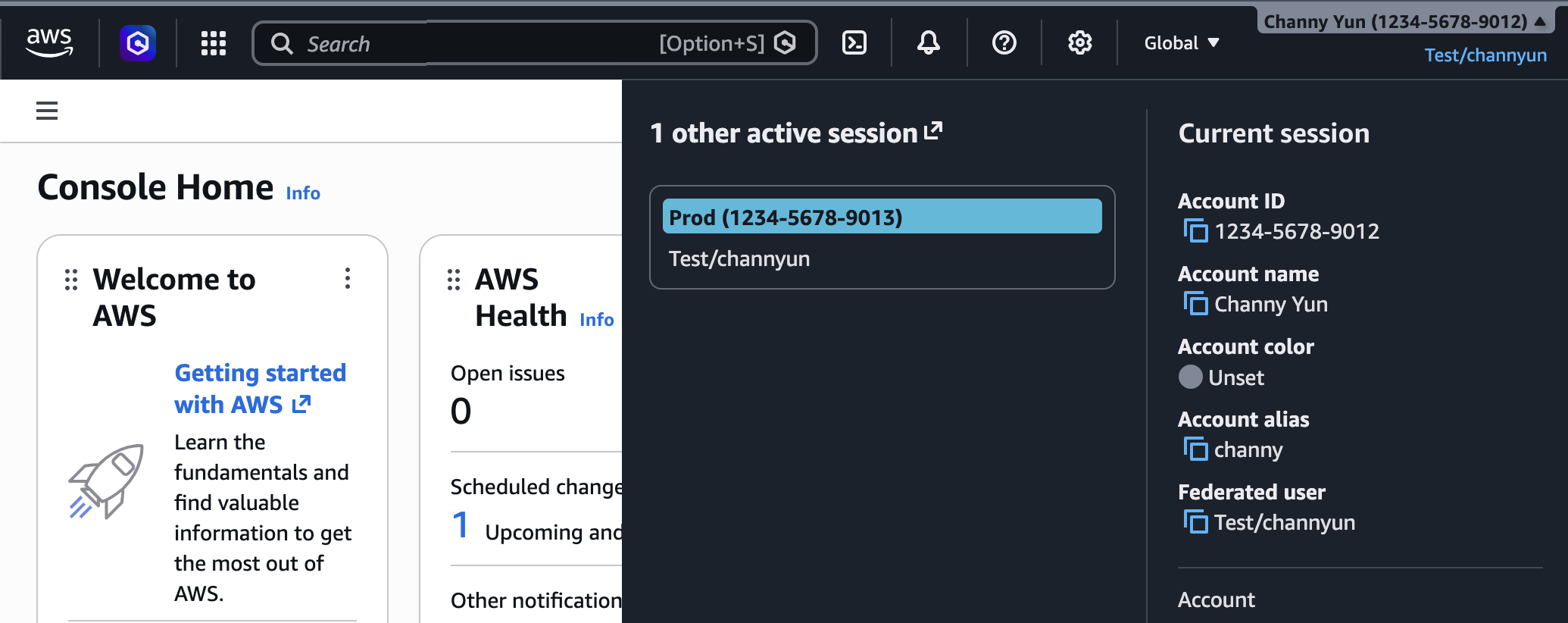
The process is straightforward: an administrator signs into the AWS Management Console, navigates to their account name on the navigation bar, and selects "Account" to access "Account display settings." Here, they can choose a preferred color and update the setting. This immediate visual feedback helps prevent common operational mistakes, such as accidentally deploying resources to a production account when intending to use a development environment. The consistent application of a color scheme across an organization can become a powerful operational safety net and a key component of an effective governance strategy.
Streamlining Navigation: Region and Service Visibility
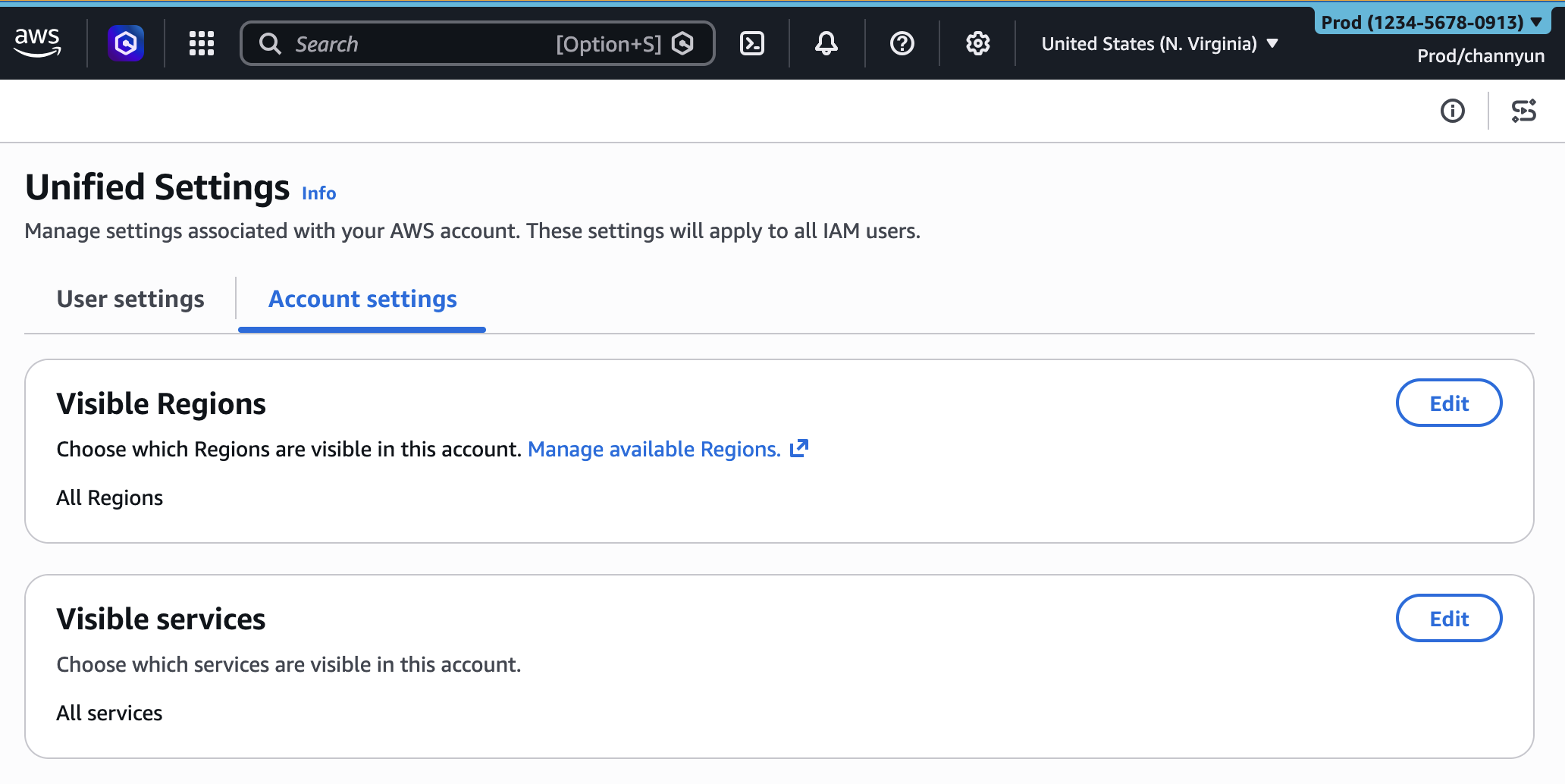
The newly launched capabilities allow administrators to control precisely which AWS Regions appear in the Region selector and which AWS services are visible in the console navigation. This granular control is managed through the unified settings accessible via the gear icon on the navigation bar, under a new "Account settings" tab for administrators.
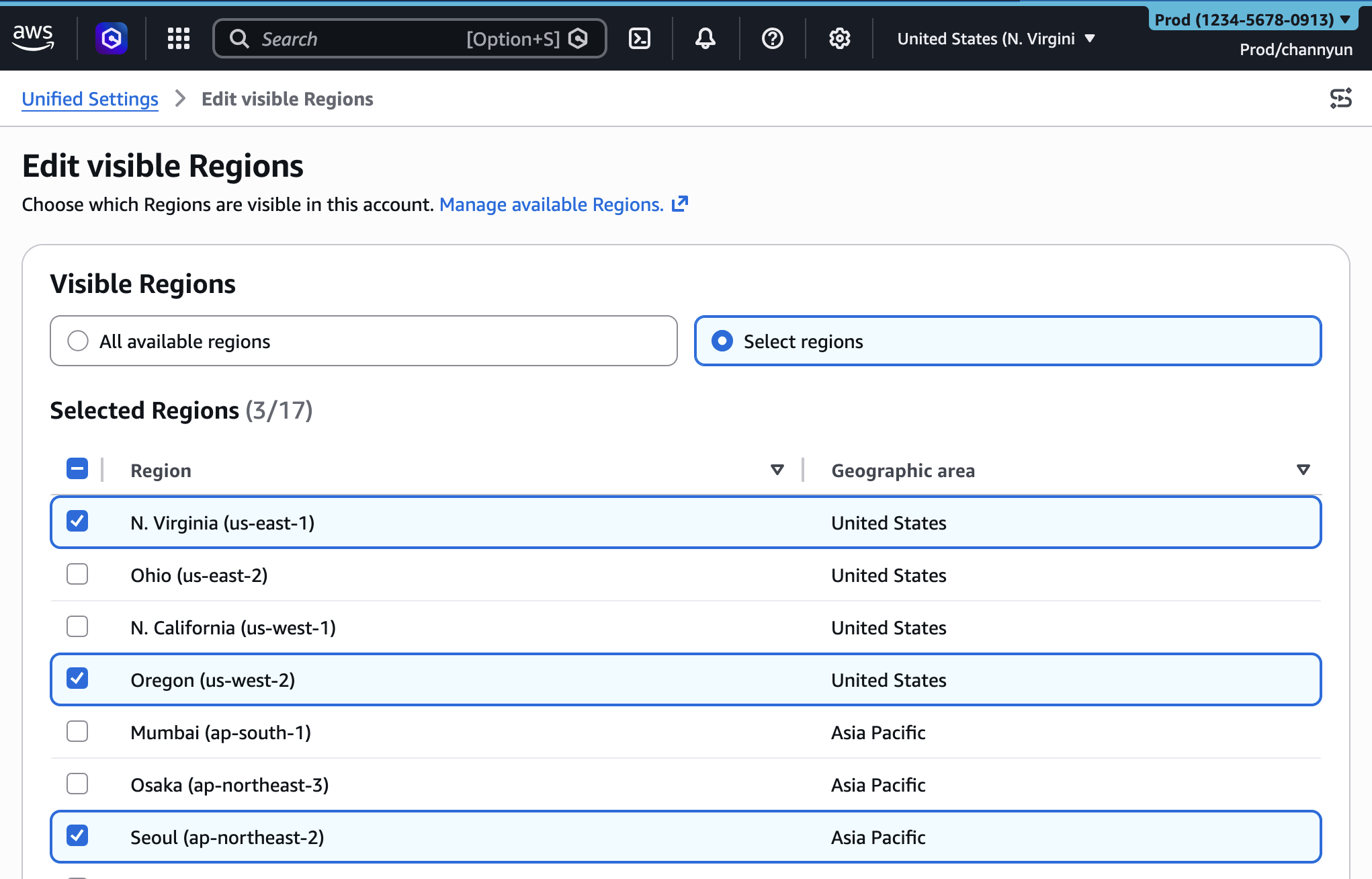
- Customizing Visible Regions: Administrators can choose to display "All available Regions" or "Select Regions." By opting for the latter, they can handpick a list of Regions relevant to their team’s operations. Once configured, only these selected Regions will appear in the Region selector dropdown, drastically simplifying geographical navigation. This is particularly useful for organizations with strict data residency requirements or those operating within specific geographical markets.
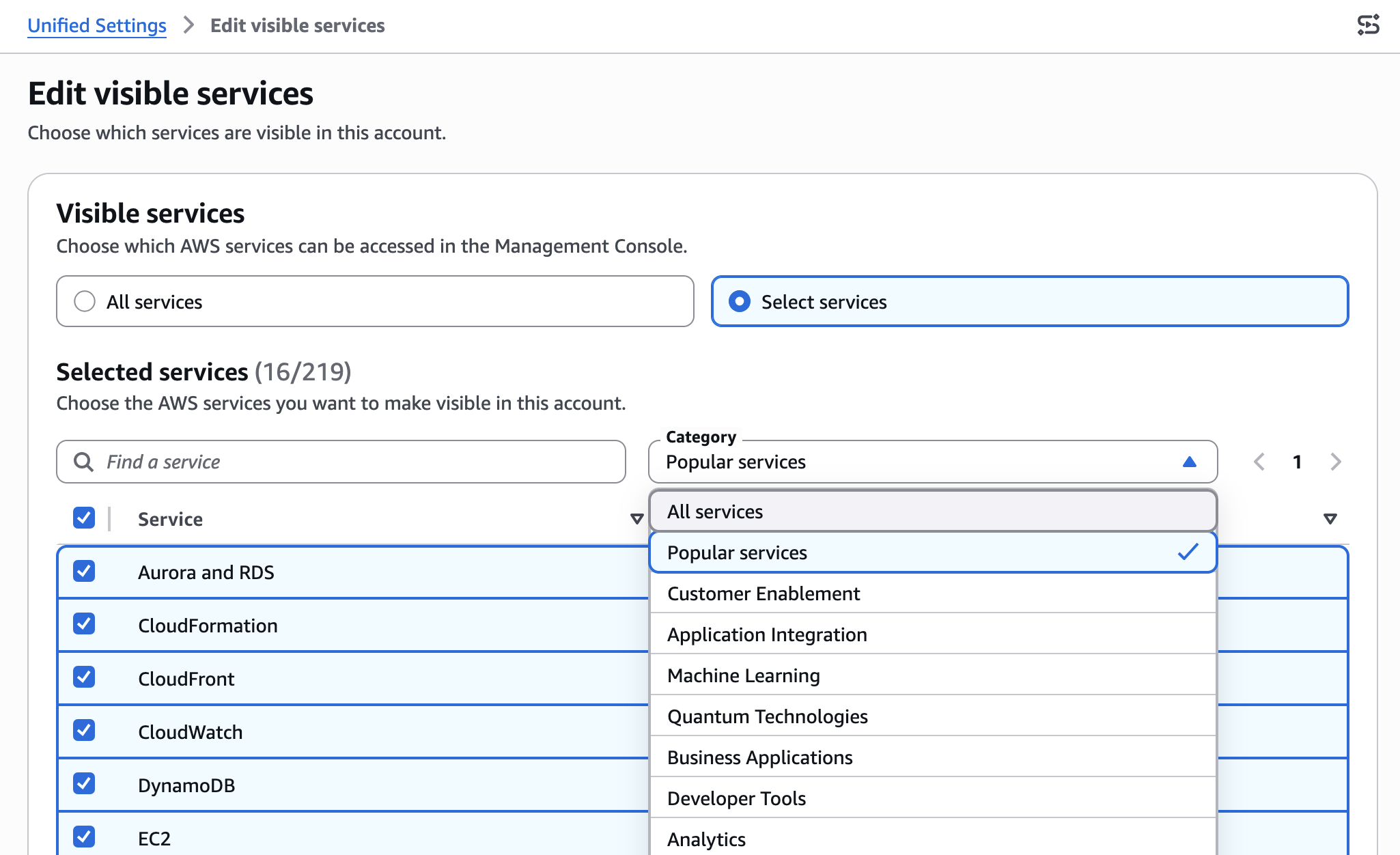
- Customizing Visible Services: Similarly, administrators can search for or select specific services from categories to curate the "All services" menu. If a team only uses Amazon S3, Amazon EC2, and AWS Lambda, the console can be configured to show only these services. This not only declutters the navigation but also guides users towards approved and relevant services, aligning with organizational best practices and potentially reducing shadow IT or the use of unapproved technologies. Even the search bar functionality respects these visibility settings, ensuring that users can only search for and select services that have been explicitly made visible.
Behind the Scenes: Implementation and Management
AWS has ensured that these customization settings are not only user-friendly through the console but also manageable programmatically, aligning with modern Infrastructure as Code (IaC) principles.
Manual Configuration for Administrators
For direct configuration, an administrator navigates to the console, clicks the gear icon in the navigation bar, and selects "See all user settings." A new "Account settings" tab is now available. Within this tab, sections for "Visible Regions" and "Visible Services" allow for direct editing. The administrator can choose from "All available Regions" or specify a custom list, and similarly, select individual services or entire categories. Once saved, these changes immediately reflect in the console experience for the account.
Programmatic Control with CloudFormation and APIs
For organizations that prioritize automation, consistency, and version control, AWS provides programmatic management of these settings through a new AWS::UXC::AccountCustomization CloudFormation resource. This resource includes AccountColor, VisibleServices, and VisibleRegions parameters, allowing administrators to define their desired console customizations within a CloudFormation template.
An example template might look like this:
AWSTemplateFormatVersion: "2010-09-09"
Description: Customize AWS Console appearance for this account

Resources:
  AccountCustomization:
    Type: AWS::UXC::AccountCustomization
    Properties:
      AccountColor: red
      VisibleServices:
        - s3
        - ec2
        - lambda
      VisibleRegions:
        - us-east-1
        - us-west-2
This template can then be deployed using the AWS CLI:
$ aws cloudformation deploy --template-file account-customization.yaml --stack-name my-account-customization
This programmatic approach ensures that console customizations can be consistently applied across multiple accounts within an AWS Organization, version-controlled, and integrated into existing CI/CD pipelines. It represents a significant step towards fully automating the setup and governance of cloud environments, extending the benefits of IaC beyond infrastructure provisioning to the user experience itself. For developers and operations teams, this means a consistent and predictable console environment, reducing configuration drift and simplifying troubleshooting. Further details are available in the AWS User Experience Customization API Reference and AWS CloudFormation template reference.
A Crucial Distinction: Visibility vs. Access Control
It is imperative to understand that these UXC settings—Regions and services visibility—control only the appearance of services and Regions within the AWS Management Console. They do not restrict actual access to these services or resources through other AWS interfaces. Access control remains the domain of AWS Identity and Access Management (IAM) policies.
This distinction is fundamental. Hiding a service in the console does not prevent a user with appropriate IAM permissions from interacting with that service via the AWS Command Line Interface (AWS CLI), AWS SDKs, direct AWS APIs, or even Amazon Q Developer. Administrators must continue to implement robust IAM policies to enforce security boundaries and access restrictions. UXC is a productivity and usability enhancement, not a security control mechanism. This design choice provides flexibility, allowing administrators to simplify the visual experience without inadvertently breaking programmatic workflows or existing security policies.
Statements and Industry Reaction
"These latest enhancements to AWS User Experience Customization underscore our unwavering commitment to providing an intuitive, efficient, and secure cloud management experience for our customers," stated a hypothetical AWS spokesperson. "As the scale and complexity of cloud deployments continue to grow, tools that reduce cognitive overhead and streamline workflows become indispensable. By empowering administrators to tailor the console to their teams’ specific needs, we are not just improving usability; we are directly contributing to enhanced productivity, reduced operational errors, and faster innovation."
Industry analysts and cloud architects have largely welcomed the new features. "This is a long-awaited and highly impactful release for enterprise customers," noted a hypothetical cloud industry analyst. "For organizations managing hundreds or thousands of AWS accounts, training new personnel, and adhering to strict compliance regimes, a cluttered console is a significant impediment. These customization options transform the console from a generic interface into a context-aware workspace, making cloud management more approachable and less error-prone. It’s a clear signal that AWS continues to prioritize the operational realities of its largest customers."
A cloud architect from a global financial institution added, "Our teams often only use a handful of services in specific Regions. Before this, they had to navigate through a jungle of options every day. Now, we can present them with a clean, focused environment that aligns perfectly with their responsibilities. The CloudFormation integration is particularly valuable for us, ensuring these customizations are part of our standard account provisioning pipeline."
Broader Implications and Strategic Value
The enhancements to AWS UXC carry several broader implications for cloud management and the future of cloud user interfaces:
- Empowering Enterprise Operations and Governance: For large enterprises, these features are invaluable for enforcing architectural standards and governance policies. By limiting visible Regions and services, organizations can gently guide users towards approved services and geographical deployments, reducing the risk of unauthorized resource provisioning. While not a hard security control, it acts as a powerful preventative measure and an aid to compliance. It also simplifies the onboarding process for new employees, presenting them with a less intimidating and more relevant console view.
- Boosting Developer Productivity and Onboarding: Developers and operators can spend less time searching for the right service or Region and more time building and deploying. This direct improvement in workflow efficiency translates into faster development cycles and quicker problem resolution. For new team members, the tailored console can significantly shorten the learning curve, making them productive more rapidly.
- The Future of Cloud User Interfaces: AWS’s move towards deep console customization highlights a broader industry trend. As cloud platforms mature, the focus is shifting from merely offering services to optimizing the interaction with those services. We can anticipate other cloud providers following suit, offering more personalized, role-based, and context-aware user interfaces to cater to diverse user needs.
- Indirect Benefits: Security and Cost Management: While UXC doesn’t directly control security or cost, a cleaner, more focused console can indirectly contribute to both. By reducing complexity and potential for misclicks, it can lower the chances of deploying resources in unintended, more expensive Regions or provisioning unapproved services. It reinforces the principle of least privilege in the user interface, complementing IAM policies.
Timeline of AWS UXC Evolution
- August 2025: AWS introduces the initial User Experience Customization (UXC) capability, primarily offering account color assignment within the AWS Management Console to visually distinguish between different AWS accounts. This marked the beginning of a more personalized console experience.
- March 2026 (Implied): AWS announces significant enhancements to UXC, adding the ability for administrators to selectively display relevant AWS Regions and services. This expands UXC beyond visual cues to offer deeper functional customization, reducing cognitive load and improving navigation efficiency.
Looking Ahead
The latest UXC enhancements underscore AWS’s continuous commitment to user-centric design and operational excellence. By providing tools that simplify the complex world of cloud management, AWS empowers its users to be more efficient, reduce errors, and focus on innovation. AWS encourages users to provide feedback on these new capabilities through the console’s feedback link, the AWS re:Post forum for the AWS Management Console, or by reaching out to their AWS Support contacts, ensuring that the evolution of the AWS Management Console continues to meet the evolving needs of its global customer base.
