

Amazon Web Services (AWS) has significantly expanded its User Experience Customization (UXC) capabilities within the AWS Management Console, introducing new features that allow administrators to selectively display relevant AWS Regions and services for their teams. This latest update, building upon the initial UXC launch in August 2025, aims to streamline cloud management workflows, reduce cognitive load, and enhance operational efficiency for enterprises navigating increasingly complex cloud environments. The new functionalities, which include the ability to customize account colors, visible Regions, and visible services, underscore AWS’s commitment to delivering a highly personalized and efficient user experience tailored to diverse organizational needs.
The Evolving Landscape of Cloud Management and the Need for Customization
The modern cloud landscape is characterized by its vastness and dynamism. Enterprises, from startups to global corporations, are increasingly adopting multi-account strategies to manage resources, enforce security policies, allocate costs, and segregate environments (e.g., development, testing, production). While this approach offers significant benefits in terms of governance and scalability, it also introduces considerable complexity. Cloud administrators and developers often interact with dozens, if not hundreds, of AWS accounts, each potentially utilizing a subset of the over 200 available AWS services across more than 30 global Regions. Navigating this intricate ecosystem through a generic, "one-size-fits-all" console can lead to decreased productivity, increased potential for human error, and a steeper learning curve for new team members.
Cognitive load, a critical factor in human-computer interaction, refers to the total amount of mental effort being used in the working memory. In a cloud console filled with irrelevant options, services, and Regions, users can experience significant cognitive overload. This not only slows down task completion but also increases the likelihood of misconfigurations or security incidents. Industry reports frequently highlight that human error remains a leading cause of data breaches and operational downtime in cloud environments. By presenting users with only the information and options pertinent to their roles and projects, AWS aims to mitigate these challenges, fostering a more focused and secure operational environment.
Chronology of User Experience Customization on AWS
The journey towards a more customizable AWS Management Console began with a clear understanding of customer feedback regarding the need for personalization and simplification.
- August 2025: AWS officially introduced the AWS User Experience Customization (UXC) capability. The initial rollout focused on foundational UI enhancements, most notably the ability for account administrators to assign a distinct color to an AWS account. This seemingly simple feature was a direct response to the prevalent challenge of visually distinguishing between multiple accounts – such as production, development, and staging – to prevent errors when switching contexts. This initial step marked a significant shift towards empowering administrators with tools to tailor the console experience.
- March 2026 (Implied): The latest announcement expands the UXC framework significantly. Today’s release builds upon the foundational account coloring by integrating selective display capabilities for both AWS Regions and services. This enhancement moves beyond mere aesthetic customization to functional simplification, allowing administrators to curate the operational environment for their teams. The combined offering – account color, Region visibility, and service visibility – provides a comprehensive suite of tools for tailoring the AWS Management Console to precise organizational requirements.
This phased approach demonstrates AWS’s iterative development philosophy, starting with high-impact, easily implementable features and progressively adding more sophisticated controls based on evolving customer needs and technological capabilities. The continuous evolution of UXC reflects a broader industry trend towards more intelligent, adaptive, and user-centric interfaces, particularly in complex enterprise software.

Deep Dive into Enhanced Customization Capabilities
The newly introduced features offer administrators granular control over the AWS Management Console’s interface, directly impacting user efficiency and reducing operational friction.
Categorizing Accounts by Color: A Visual Identifier for Operational Clarity
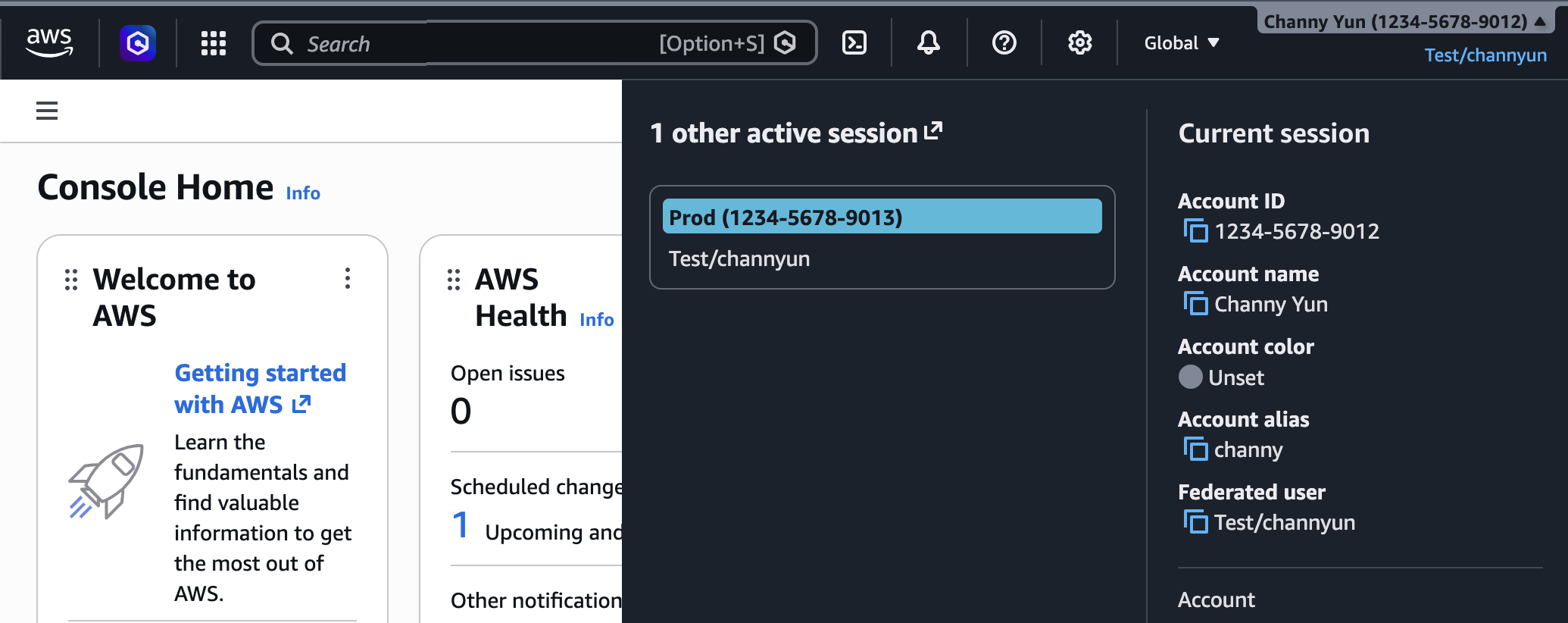
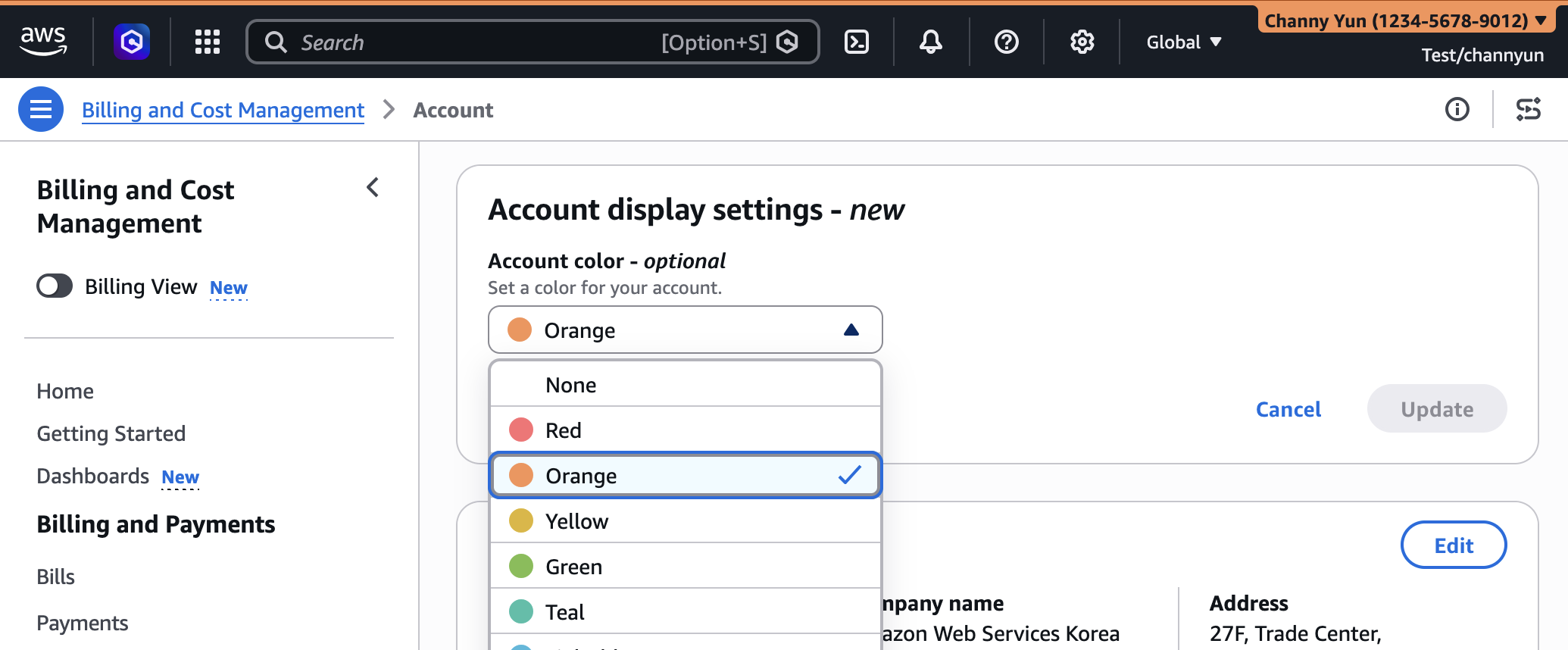
The ability to assign a unique color to each AWS account, initially launched in August 2025, is now a cornerstone of the broader UXC offering. This feature addresses a fundamental challenge in multi-account strategies: quickly identifying which account a user is currently operating within.
- How it works: Account administrators can access "Account display settings" within the console’s navigation bar to select a preferred color. This color is then prominently displayed in the navigation bar, providing an immediate visual cue.
- Benefits:
- Reduced Context Switching Errors: A common scenario involves users accidentally performing actions in a production account when they intended to be in a development or test environment. A clearly visible color indicator dramatically reduces the risk of such costly mistakes. For instance, an organization might standardize red for production accounts, orange for staging, and blue for development.
- Improved Onboarding: New team members can more quickly grasp the environment’s structure and differentiate between various accounts, accelerating their ramp-up time.
- Enhanced Focus: By providing a persistent visual anchor, the feature helps users maintain awareness of their current operational context, minimizing distractions and improving focus on the task at hand.
- Governance Adherence: It supports organizational governance by making account types instantly recognizable, reinforcing policies and best practices.
While seemingly simple, the psychological impact of color coding in complex interfaces is well-documented, significantly aiding in pattern recognition and reducing cognitive load.
Customizing Region Visibility: Tailoring Geographical Scope
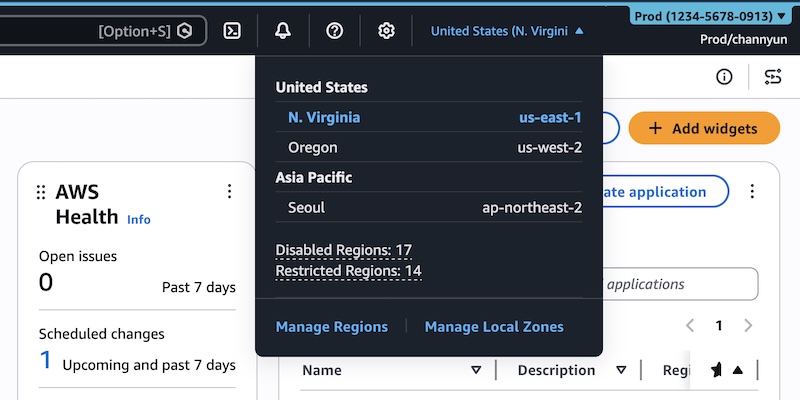
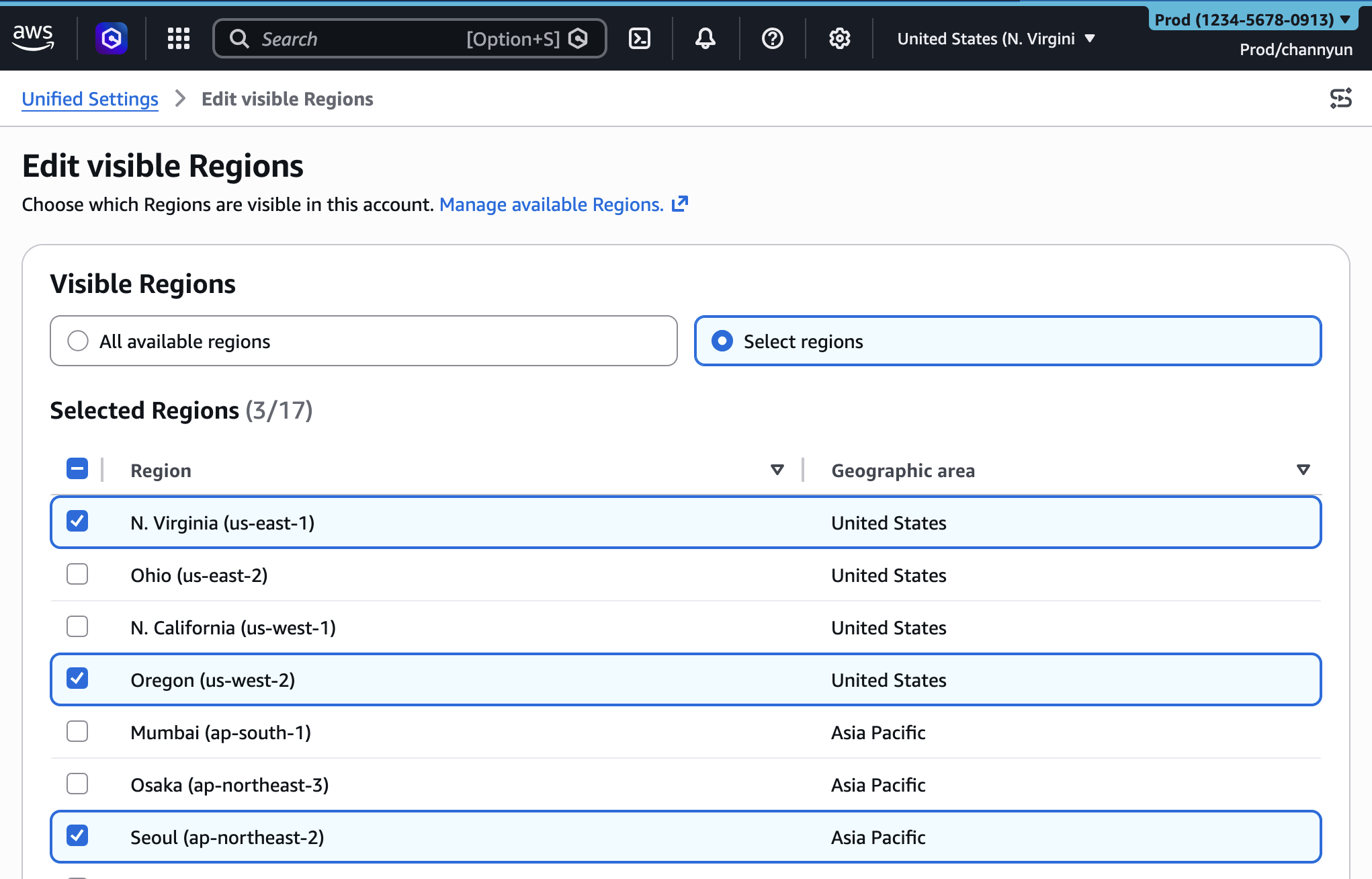
For many organizations, only a subset of AWS’s global Regions is relevant for their operations due to compliance requirements, data residency laws, latency considerations, or cost optimization strategies. Displaying all available Regions can be distracting and lead to unnecessary clicks.
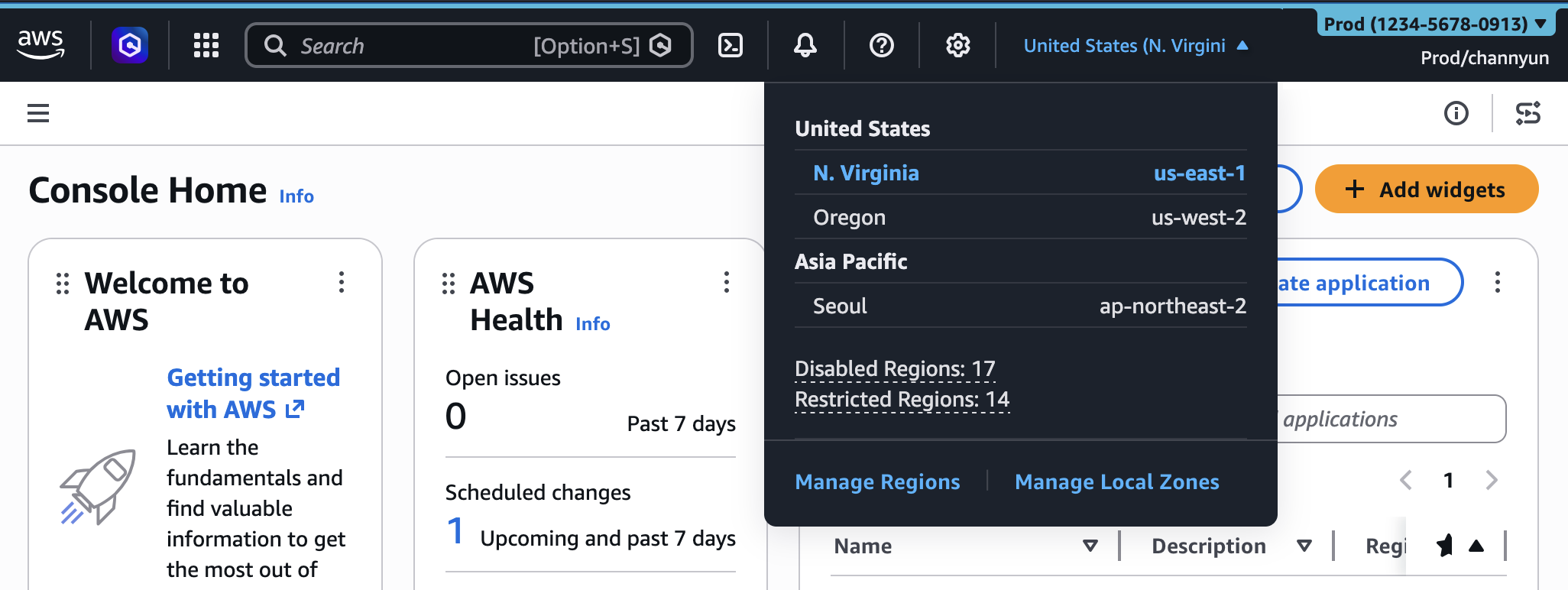
- How it works: Administrators can now configure which AWS Regions appear in the Region selector dropdown menu on the console navigation bar. This setting is managed through the "Account settings" tab within the unified settings, accessible via the gear icon. Administrators can choose to display "All available Regions" or "Select Regions" and curate a specific list.
- Benefits:
- Streamlined Navigation: Users only see the Regions they are authorized or required to interact with, eliminating clutter and speeding up the selection process. This is particularly valuable for global enterprises with distributed teams, where each team might only operate within a specific geographical footprint.
- Reduced Error Potential: By hiding unused Regions, the risk of deploying resources in an incorrect or non-compliant Region is significantly minimized. This is crucial for adhering to data sovereignty laws like GDPR or industry-specific regulations.
- Enhanced Focus: Developers and operations teams can concentrate on their designated operational zones without the distraction of irrelevant geographical options.
- Improved Compliance Posture: Helps enforce organizational policies regarding data residency and geographical deployment boundaries by visually guiding users towards approved Regions.
This feature aligns with the principle of "least privilege" not just for access, but for visual information, ensuring users interact only with what is necessary and permitted.
Customizing Service Visibility: Focusing on Core Functionalities
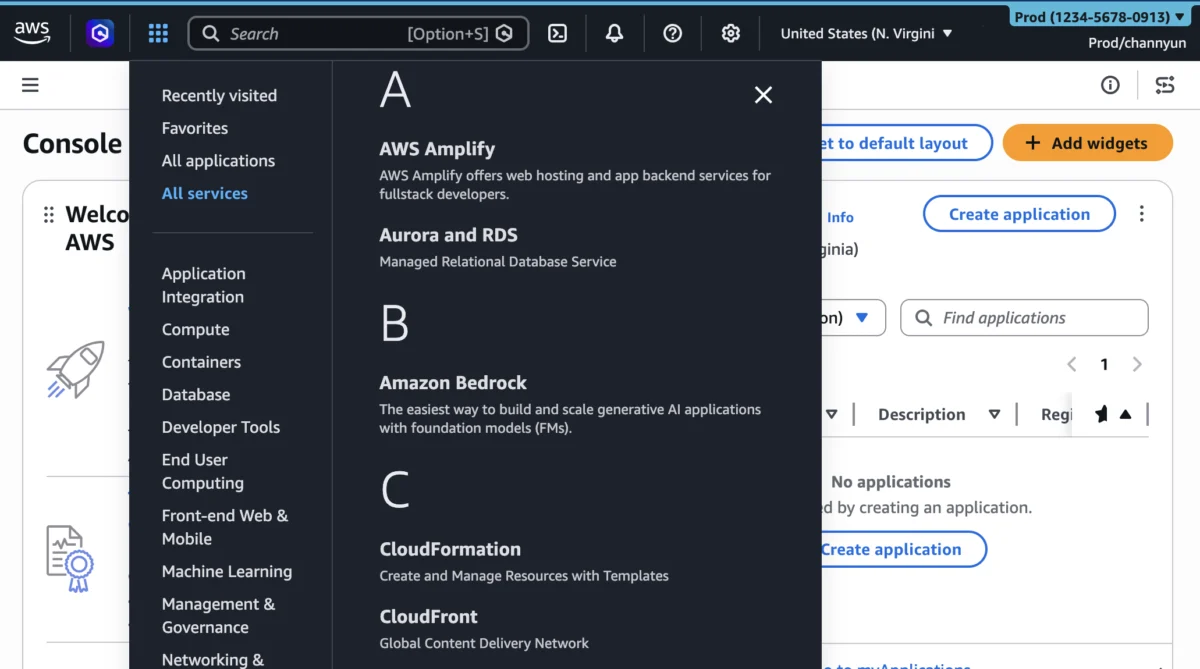
With over 200 services continually evolving, the AWS Management Console’s "All services" menu can be overwhelming. Many teams only regularly interact with a fraction of these services.
- How it works: Similar to Region visibility, administrators can now control which AWS services appear in the console navigation’s "All services" menu and in the search bar’s auto-completion. This is also configured in the "Account settings" tab, allowing administrators to search for and select specific services or choose from categories like "Popular services."
- Benefits:
- Accelerated Workflow: Users can quickly locate and access the services critical to their daily tasks without sifting through a long list of irrelevant options. This directly translates to faster task completion and increased productivity.
- Reduced Cognitive Overload: By presenting a curated list of services, the cognitive burden on users is significantly reduced, allowing them to focus on service-specific configurations rather than console navigation.
- Simplified Onboarding: New cloud practitioners can be onboarded more efficiently, as their console experience is tailored to the specific services they need to learn and use, reducing the initial intimidation often associated with the breadth of AWS.
- Enhanced Security (Indirect): While these settings do not restrict access via API or CLI, a simplified console interface can indirectly reduce the likelihood of accidental misconfigurations in unused services, complementing IAM policies.
- Customized Role-Based Experiences: Different teams (e.g., data scientists, network engineers, front-end developers) often use distinct sets of AWS services. This feature allows administrators to craft bespoke console experiences for each role, optimizing their efficiency.
It’s important to note that these visibility settings exclusively impact the console’s appearance and do not restrict access through programmatic interfaces such as the AWS Command Line Interface (AWS CLI), AWS SDKs, AWS APIs, or Amazon Q Developer. Access control remains the purview of AWS Identity and Access Management (IAM) policies, ensuring a robust security perimeter.
Programmatic Control and Enterprise Governance
Beyond manual configuration through the console, AWS has provided robust programmatic control for these UXC settings, a critical capability for large enterprises.
-
AWS CloudFormation Integration: Administrators can manage account customizations, including
AccountColor,VisibleServices, andVisibleRegions, through AWS CloudFormation templates. This allows for infrastructure-as-code (IaC) principles to be applied to console personalization, ensuring consistency, version control, and automated deployment across multiple accounts.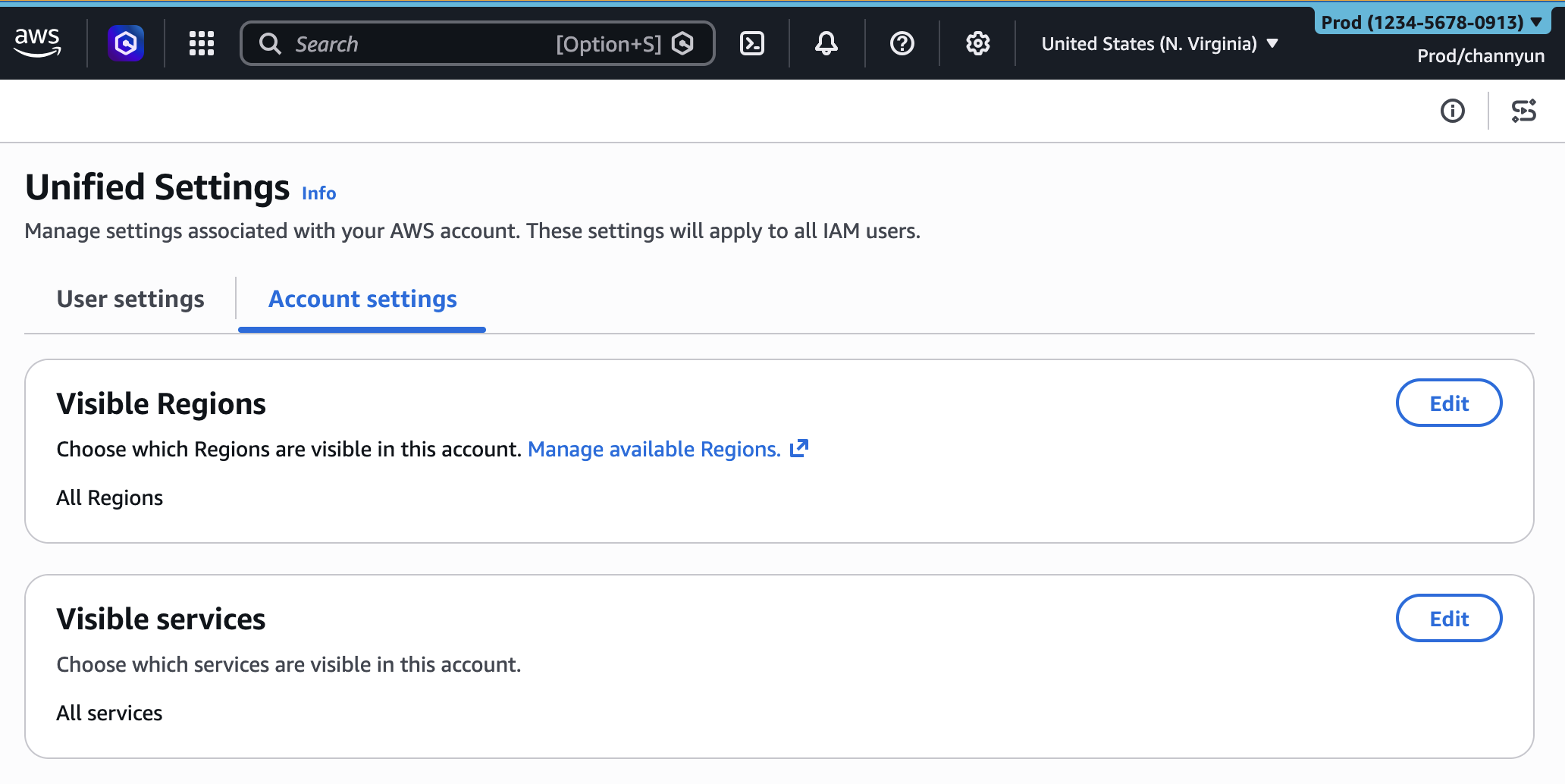
AWSTemplateFormatVersion: "2010-09-09"
Description: Customize AWS Console appearance for this account

Resources:
  AccountCustomization:
    Type: AWS::UXC::AccountCustomization
    Properties:
      AccountColor: red
      VisibleServices:
        - s3
        - ec2
        - lambda
      VisibleRegions:
        - us-east-1
        - us-west-2
This CloudFormation resource
AWS::UXC::AccountCustomizationempowers central IT or cloud governance teams to define and enforce standardized console experiences across an entire organization, ensuring compliance and operational uniformity. - AWS User Experience Customization API Reference: The underlying API allows for direct programmatic management of these settings, providing flexibility for integration with custom tools or existing governance platforms.
The availability of programmatic management is a significant boon for large organizations. It transforms console customization from a manual, account-by-account task into an automated, centrally managed process, reinforcing enterprise-wide standards and policies. This level of control is essential for maintaining consistent operational environments and ensuring that all teams benefit from a streamlined, tailored console experience.
Official Responses and Anticipated Impact
An AWS spokesperson, commenting on the new capabilities, stated, "Our customers operate at immense scale, and managing cloud resources efficiently is paramount. The expansion of AWS User Experience Customization is a direct response to their feedback, providing tools that reduce cognitive overhead and significantly enhance productivity. By allowing administrators to tailor the console to specific team needs, we’re not just improving the user interface; we’re fundamentally simplifying cloud operations and empowering our customers to innovate faster and with greater confidence."
Industry analysts are also weighing in. "The move by AWS to offer more granular UI customization is a smart play," noted a lead analyst from a prominent cloud research firm. "As cloud environments become more expansive and multi-account strategies proliferate, the ‘default’ console can quickly become a source of friction. Features like Region and service visibility directly address real-world pain points, leading to measurable gains in developer productivity and a reduction in operational errors. This is a crucial step towards making complex cloud management more accessible and less error-prone."
Customers who have previewed the features expressed enthusiasm. A Senior Cloud Architect from a multinational financial institution remarked, "Managing dozens of AWS accounts for different business units and environments was a constant challenge. The account coloring alone was a game-changer for preventing costly mistakes. Now, with the ability to hide irrelevant services and Regions, our teams can work faster and with less distraction. It’s about reducing the noise and letting our engineers focus on building, not navigating."
Broader Implications and Future Outlook
The enhanced AWS UXC capabilities carry significant implications for the future of cloud management:
- Increased Operational Efficiency: By reducing the time spent navigating and searching, users can dedicate more effort to actual development and operational tasks. This translates directly into faster project delivery cycles and improved time-to-market for new applications and services.
- Improved Security Posture: While not a direct security control, a simplified interface reduces the likelihood of human error, which is a common vector for security incidents. Less clutter means fewer opportunities for misclicks or accidental deployments in unintended locations or services.
- Enhanced Developer Experience (DevEx): A personalized and less overwhelming console contributes to a more positive developer experience, fostering greater satisfaction and reducing burnout often associated with complex systems. This can be a key factor in talent retention.
- Better Governance and Compliance: The programmatic control via CloudFormation empowers organizations to enforce standardized console configurations that align with their internal governance frameworks, compliance requirements, and security policies.
- Scalability and Adaptability: As AWS continues to launch new services and Regions, the ability to selectively display only what’s relevant ensures that the console remains manageable and efficient, regardless of the platform’s growth.
- Foundation for Further Personalization: This release lays the groundwork for potentially more advanced customization options in the future, such as custom dashboard layouts, role-based content, or even AI-driven console recommendations.
The AWS Management Console, as the primary graphical interface for interacting with AWS, is a critical component of the cloud experience. By investing in robust user experience customization, AWS is not just making the console easier to use; it’s recognizing and responding to the evolving needs of its diverse customer base operating at an unprecedented scale. This strategic enhancement is poised to deliver tangible benefits in productivity, error reduction, and overall operational excellence for cloud users worldwide.
The new customization capabilities are available immediately in the AWS Management Console. Users are encouraged to try the features and provide feedback through the console’s feedback link, the AWS re:Post forum for the AWS Management Console, or their AWS Support contacts.
