


A long-standing frustration for Android users, particularly those reliant on instant messaging platforms like WhatsApp, is set to be significantly alleviated. Google has announced a pivotal integration that will centralize WhatsApp backup management directly within Android’s native system settings, aiming to resolve the prevalent issues of data loss and complicated restoration processes during device migration. This strategic move, slated for a progressive rollout starting with the Google Play System Updates of June 2026, marks a substantial shift in how third-party application data is handled on the Android platform.
The Fragmented Landscape of Mobile Data Backup
The current process for backing up WhatsApp data on Android devices has been a source of considerable user confusion and inconvenience. Unlike many native system settings and application data that are seamlessly restored during a device setup from a previous backup, WhatsApp’s extensive chat history, media, and stickers have historically required a separate, manual intervention. This disconnect often leads to critical data loss for users who are unaware of the specific steps needed or encounter errors during the backup process.
The existing mechanism relies on Google Drive for Android users and iCloud for iOS users. WhatsApp, an application developed by Meta, packages all user information – including texts, photos, videos, and stickers – and transmits it to a dedicated directory within the user’s associated cloud storage account. While Meta facilitates the data packaging, it does not directly host the backups; the responsibility falls to Google or Apple as the cloud service providers. This architecture, while functional, often creates a disjointed user experience. Users must navigate within the WhatsApp application itself to configure backup frequency, initiate manual backups, or verify the status of their last save. This inherent separation means that even a comprehensive factory reset and restoration from an Android system backup often leaves WhatsApp data conspicuously absent, forcing users into a frantic search for their lost conversations.
The problem is exacerbated by several factors:
- User Oversight: Many users, especially those less tech-savvy, may forget to configure WhatsApp backups or assume they are covered by general phone backups.
- Backup Failures: Technical glitches, insufficient cloud storage, or unstable internet connections can lead to incomplete or corrupted backups, a common occurrence reported by users. The original article’s author notes this personally, stating, "It doesn’t always work correctly; it’s susceptible to error (it happens to me often)."
- Lack of Visibility: The current system offers limited transparency on the status and integrity of WhatsApp backups from a holistic system perspective. Users often only discover a backup failure when attempting to restore it on a new device, by which time it’s too late.
- Encryption Confusion: While WhatsApp offers end-to-end encrypted backups, this feature must be actively enabled by the user. If not, the backup remains vulnerable to potential access, although Google maintains that data stored in Drive is subject to its robust security protocols. The distinction between general cloud encryption and specific end-to-end backup encryption for WhatsApp adds another layer of complexity.
Given that WhatsApp boasts over two billion active users worldwide, making it the most popular messaging application globally, the scale of this problem is immense. Millions of users routinely upgrade or replace their smartphones, making a smooth data migration process not just a convenience, but a critical expectation.
Google’s Integrated Solution: A Paradigm Shift
Recognizing these systemic challenges, Google is stepping in to streamline the WhatsApp backup process by integrating its management directly into Android’s core settings. This move is designed to bring a much-needed layer of consistency and control to an otherwise fragmented user journey.
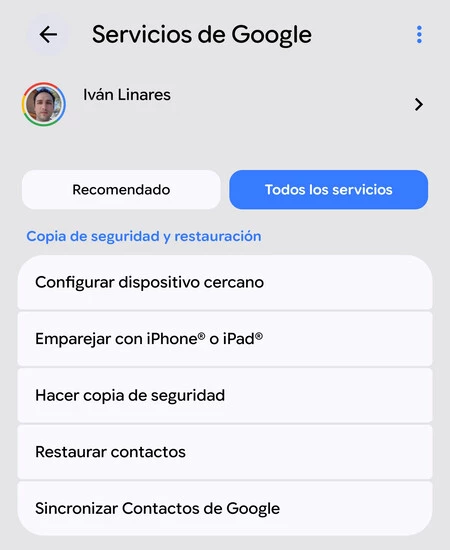
Under the new system, Android users will no longer need to delve into WhatsApp’s internal settings to manage their backups. Instead, a dedicated section within the Android device’s settings menu will allow users to:

- Access Backup Information: View details about their WhatsApp backups, including creation dates, sizes, and associated accounts.
- Manage Backup Preferences: Potentially adjust backup frequency, choose network preferences (Wi-Fi only or cellular data), and activate or deactivate end-to-end encryption for backups, all from a centralized location.
- Initiate Restorations: While the actual data transfer during restoration will still involve the WhatsApp application, the overarching management and initiation of the process will be more tightly coupled with Android’s system-level functionalities.
The primary benefit highlighted by this integration is the enhanced ease of access and improved visibility for users. By centralizing these critical settings, Google aims to minimize instances of forgotten or failed backups, ensuring a more reliable and intuitive experience when migrating to a new device. This shift is particularly significant because it places the control and oversight of a major third-party application’s data directly within the operating system, reinforcing Android’s role as the primary orchestrator of the user’s digital life on their device.
It is crucial to note that while Google is centralizing the management of these backups, the creation of the backup itself will still originate from the WhatsApp application. This means that users will still need to ensure WhatsApp is properly configured for backup frequency within its own app to prevent data loss. However, the system-level visibility should make it far easier to verify if these configurations are indeed active and successful.
Historical Context and Evolution of Android Data Management
The journey of data backup on Android has been one of continuous evolution. In its early days, Android backups were often rudimentary, relying heavily on manual file transfers or third-party tools. Over time, Google introduced more robust cloud-based backup solutions for system settings, Wi-Fi passwords, app data (for apps that support it), and call history. Google Drive has become the cornerstone of this ecosystem, providing a centralized cloud storage solution for various types of user data.
However, the nature of WhatsApp’s backup, involving large volumes of chat data and media, presented a unique challenge. Unlike simpler app data which might be covered by Android’s native app data backup (which typically restores app settings, not content), WhatsApp’s extensive content required a more specialized approach. The decision to offload this to Google Drive was a practical solution, leveraging existing cloud infrastructure. Yet, the segregation of its management from core Android settings created the "pain point" that Google now seeks to address. This integration can be seen as a natural progression in Google’s efforts to create a more cohesive and user-friendly Android experience, where core functionalities are seamlessly integrated rather than scattered across various application interfaces. It aligns with a broader industry trend towards deeper operating system control over crucial user data management.
Implications for User Privacy and Data Control
The integration of WhatsApp backup management into Android’s system settings inevitably raises questions about user privacy and Google’s evolving control over user data. While the convenience factor for users is undeniable, the increased centralization of data management under Google’s purview warrants examination.
Google has consistently asserted that it cannot access the content of WhatsApp backups stored on Google Drive, particularly if those backups are protected with end-to-end encryption. The introduction of end-to-end encrypted backups for WhatsApp on Google Drive in 2021 was a significant step towards enhancing user privacy, allowing users to secure their chat history with a password or a 64-digit encryption key. This ensures that even Google, as the cloud provider, cannot decrypt the backup content without the user’s specific key.
However, even without direct access to content, Google gains a more comprehensive oversight of the metadata associated with these backups. This includes information such as when backups are performed, their size, and potentially the frequency of data transfers. While this metadata might seem innocuous, in the broader context of data aggregation, it contributes to Google’s understanding of user behavior and application usage patterns. This increased control aligns with Google’s overarching strategy for Android, which increasingly emphasizes system-level management and integration of various services to create a more unified and powerful ecosystem. As Android evolves, Google is progressively enhancing its ability to orchestrate user data and experiences, aiming to offer a more seamless and personalized interaction with their devices and services.
This move also highlights the delicate balance between user convenience and data privacy in the digital age. Users typically prioritize ease of use, and a centralized backup solution undoubtedly offers that. However, it also means entrusting more aspects of one’s digital life to a single platform provider. Google’s responsibility will be to maintain transparency regarding data handling and to continue reinforcing its commitment to privacy, especially concerning encrypted data.
Broader Industry Context and Competitive Landscape
This development also has implications for the broader messaging app ecosystem and the ongoing competition among tech giants. While WhatsApp dominates in many regions, other messaging apps like Telegram and Signal offer different approaches to data backup and privacy. Telegram, for instance, stores all user chats in its cloud, making them accessible across devices without a separate backup process, though not end-to-end encrypted by default for all chats. Signal, known for its stringent privacy, offers local encrypted backups or device-to-device transfers, consciously avoiding cloud storage for user data to minimize external vulnerabilities.
Google’s integration for WhatsApp signals a strategic move to solidify Android’s appeal as a platform that can seamlessly manage even complex third-party application data. By addressing a major pain point for WhatsApp users, Google enhances the overall stickiness of the Android ecosystem. This could potentially pave the way for similar integrations with other popular applications, making Android an even more robust and user-friendly platform for managing diverse digital lives. It underscores the ongoing platform wars, where user experience and data control are key battlegrounds.
Official Responses and Anticipated Rollout
While specific direct quotes from Google or Meta regarding this particular integration are not widely publicized, the announcement through the Google Play System Updates framework indicates an official endorsement of this direction. It can be logically inferred that Google aims to "enhance user experience," "streamline data management," and "improve the reliability of data migration" on Android. From Meta’s perspective, this initiative likely aligns with their goal of ensuring a smooth and reliable experience for WhatsApp users on Android, as it directly addresses a common frustration reported by their user base. Such collaborations between platform providers and major app developers are common in the tech industry, driven by mutual benefits of improving user satisfaction and ecosystem stability.
The rollout of this feature will begin progressively with the Google Play System Updates of June 2026. "Progressive rollout" means that the update will not be available to all Android users simultaneously. Instead, it will be distributed in phases, starting with a smaller group of users and gradually expanding to a larger audience. This phased approach allows Google to monitor for any unforeseen issues or bugs and address them before a widespread deployment, ensuring a stable and reliable launch for all. Users should keep their Android devices and Google Play Services updated to ensure they receive the feature as soon as it becomes available in their region.
Future Outlook and Potential Enhancements
Looking ahead, this integration could be a precursor to more sophisticated data management features within Android. One could foresee tighter integration with Google One, Google’s subscription service for cloud storage and other benefits, offering premium backup options or more granular control over data. There might also be future possibilities for improved cross-platform migration tools, although the complexities of different operating systems and privacy frameworks make such developments challenging.
Moreover, this move could set a precedent for how Android handles backups for other data-heavy messaging applications or social media platforms. By demonstrating a successful model for integrating third-party app backups into the core OS, Google could encourage other developers to adopt similar approaches, leading to a more unified and less frustrating backup experience across the entire Android app ecosystem. This is a significant step towards a more mature and user-centric approach to mobile data management, reducing the digital anxiety associated with device changes and ensuring that precious digital memories remain secure and accessible.
The integration of WhatsApp backup management into Android’s system settings is more than just a minor update; it represents a significant leap forward in user convenience and data management strategy for the world’s most popular mobile operating system. By directly addressing a critical user pain point and centralizing control, Google is not only enhancing the Android experience but also subtly reinforcing its control over the platform’s data ecosystem. As the digital lives of billions become increasingly intertwined with their smartphones, such strategic integrations will be crucial in shaping the future of mobile technology.
