


Users across the Android ecosystem, particularly those with Samsung Galaxy devices, frequently report experiencing rapid battery depletion and unusual device heating, even when their smartphones are relatively new or not under heavy load. This pervasive issue often leads to significant user frustration and concerns about device longevity. A deep dive into the underlying causes points predominantly to the myriad of default background processes initiated by Google services, which are often activated without explicit user consent or full awareness. These processes, while ostensibly designed to enhance user experience, concurrently consume substantial device resources, contributing directly to reduced battery life, elevated operating temperatures, and increased mobile data consumption. This report will dissect the nature of these background operations, analyze their impact, and provide a comprehensive guide to mitigating their effects, thereby empowering users to reclaim control over their device performance and digital privacy.
The Pervasive Nature of Background Processes in Modern Smartphones
Modern smartphones are sophisticated computing devices, and their functionality relies heavily on processes running continuously in the background. These background operations serve a multitude of purposes, from synchronizing email and social media notifications to updating applications, backing up data, and providing real-time location services. For instance, push notifications, which alert users to new messages or updates, necessitate an active background connection. Similarly, cloud synchronization services for photos, documents, and contacts require continuous, albeit intermittent, background activity to keep data consistent across devices.
However, a critical distinction must be drawn between essential background processes that facilitate core smartphone functionality and those that primarily serve data collection or analytics purposes, often without immediate or apparent benefit to the end-user. The Android operating system, being a product of Google, is deeply integrated with Google’s extensive suite of services, many of which come pre-activated with default settings that prioritize data collection for the company’s various objectives. This "opt-out" rather than "opt-in" approach to data sharing is a fundamental aspect of Google’s business model, where free services are exchanged for user data.
Google’s Ecosystem and the Rationale for Data Collection
Google openly states that its data collection practices are aimed at "improving user experience." This broad justification encompasses several key areas: personalized recommendations, targeted advertising, and the development of artificial intelligence and machine learning models. For example, by collecting location data, Google Maps can provide more accurate traffic predictions and suggest relevant local businesses. Analyzing search queries and browsing history allows Google to tailor search results and display more pertinent advertisements. The aggregated data from countless users contributes to refining Google’s AI capabilities, from language processing in Google Assistant to image recognition in Google Photos.
Economically, Google’s business model is largely supported by advertising. In 2023, Google’s parent company, Alphabet, reported advertising revenues exceeding $224 billion, underscoring the immense value of user data in its ecosystem. The more data Google collects about user preferences, behaviors, and demographics, the more effectively it can target ads, making its advertising platforms more attractive to businesses. This intricate relationship means that while users enjoy "free" access to powerful tools like Gmail, Google Maps, and Google Search, their devices are simultaneously engaged in a continuous, often invisible, exchange of data that fuels Google’s commercial engine.
Specific Google Services and Their Resource-Intensive Data Practices
Several Google services are commonly identified as significant contributors to excessive battery drain and device overheating due to their default background operations:
-
Google Maps: Beyond active navigation, Google Maps can continuously track location, build a detailed location history, and pre-cache map data for faster loading. This involves constant use of GPS, Wi-Fi, and cellular triangulation, all of which are power-intensive. The app may also collect data on transportation methods, frequented locations, and search queries within the app, feeding into personalized recommendations and advertising profiles. Even when not actively using the app, background location services may be running to update your timeline or provide location-based suggestions.
-
Gmail and Google Contacts: These services are designed for seamless synchronization across devices. While beneficial for keeping communications and contact lists up-to-date, this involves continuous background activity. Gmail actively scans incoming emails for spam, malware, and keywords to enable smart replies and categorization. Google Contacts synchronizes your entire address book, potentially uploading new contacts or changes to the cloud. The privacy implications of Google indexing personal communications and contact lists for various purposes, including ad targeting and AI training, are a recurrent concern among users and privacy advocates. The article’s original observation about Google "hurgando en mi agenda de contactos" (rummaging through my contact list) highlights this specific privacy apprehension.

-
"Medios externos" (External Media): While vaguely described in the original text, this likely refers to services such as Google Photos or similar media management applications. Google Photos, for instance, offers unlimited storage for compressed images and videos, often automatically backing up content in the background. This process involves significant network activity (uploading large files) and processor usage (compressing and analyzing media for facial recognition, object identification, and content categorization). These analyses, while enabling features like smart albums and searchability, are resource-intensive and contribute to battery drain and heat generation.
-
Google Play Services: This is a crucial component of Android, providing core functionalities and APIs for other Google apps and third-party applications. While not an app itself, it orchestrates many background activities, including app updates, push notifications, location services, and authentication. Its pervasive nature means that issues within Google Play Services can have a cascading effect on battery life and performance across the entire device.
-
Google Assistant and Voice Activity: Always-on listening for "Hey Google" commands requires continuous microphone access and processing, consuming power even when the device appears idle. Similarly, Google’s "Web & App Activity" and "Voice & Audio Activity" settings, if enabled, log user interactions across Google services, further contributing to background data collection and processing.
Technical Implications: The Link Between Background Processes, Battery Drain, and Heat
The cumulative effect of numerous background processes is a significant drain on smartphone resources, directly leading to reduced battery life and increased device temperature.
- CPU Cycles: Every background task, no matter how small, requires the Central Processing Unit (CPU) to perform calculations. When multiple processes run simultaneously, the CPU works harder, consuming more power. Modern smartphone CPUs are designed for efficiency, but continuous activity still generates heat.
- Network Activity: Uploading data (telemetry, backups, user activity logs) and downloading updates or fresh content requires the device’s cellular or Wi-Fi radio to be active. Network transceivers are power-hungry components, and frequent data transmission significantly impacts battery life.
- GPS and Location Services: Global Positioning System (GPS) modules are among the most power-intensive components in a smartphone. Services that frequently request precise location data, like Google Maps or location history, keep the GPS active, leading to rapid battery drain.
- Storage I/O: Reading from and writing to the device’s internal storage (e.g., caching data, saving logs, processing media files) also consumes power. Constant input/output operations contribute to overall resource utilization.
- RAM Usage: Each active background process occupies a portion of the device’s Random Access Memory (RAM). While RAM itself is relatively power-efficient, managing more processes requires more CPU cycles for memory allocation and context switching.
The generation of heat is a direct byproduct of energy consumption within the device’s electronic components. When the CPU, GPU, network radios, and other chips are actively working, they dissipate energy as heat. Excessive heat is not merely an inconvenience; it can accelerate the degradation of the lithium-ion battery, shortening its overall lifespan. According to studies by battery research institutions, prolonged exposure to temperatures above 30-35°C can permanently reduce a battery’s capacity over time. Thus, mitigating unnecessary background activity not only improves daily autonomy but also extends the total operational life of the battery.
Chronology of User Concerns and Android’s Evolution in Privacy
The concerns regarding battery drain and privacy are not new. With the rapid evolution of Android, Google’s services have become increasingly sophisticated and intertwined with the OS.
- Early Android (pre-2010): Simpler OS, fewer pre-installed Google services, and less sophisticated data collection. Battery life was often limited by hardware, but background activity was less complex.
- Growth of the Google Ecosystem (2010-2015): As Android matured, Google integrated more services (Maps, Gmail, YouTube, Google Now) more deeply into the OS. This era saw an increase in background synchronization and data collection capabilities. User complaints about "wakelocks" (processes preventing the phone from sleeping) became common.
- Increased Privacy Awareness and Android’s Responses (2015-present): Following growing public and regulatory scrutiny over data privacy, Google began introducing more granular controls.
- Android Marshmallow (6.0, 2015): Introduced Doze mode, which puts apps into a deep sleep when the device is stationary and unused, and App Standby, which restricts background network access for infrequently used apps. Runtime permissions also gave users more control over what apps could access.
- Android Oreo (8.0, 2017): Further restricted background app activity, limiting how often apps could retrieve the user’s current location.
- Android Pie (9.0, 2018): Introduced Adaptive Battery, which uses machine learning to prioritize battery for apps users use most, and App Actions, which predict user intent.
- Android 10 (2019): Enhanced location permissions, allowing users to grant location access only while an app is in use.
- Android 11 (2020): Introduced one-time permissions and auto-reset of permissions for unused apps.
- Android 12/13/14 (2021-2023): Continued to refine privacy dashboards, notification controls, and background activity restrictions, giving users more transparency and control.
Despite these advancements, default settings for many Google services continue to favor extensive background activity and data collection, necessitating proactive user intervention.
Statements and Reactions from Related Parties
While direct, explicit statements on this specific issue are rare, the inferred positions of key players can be understood:
- Google’s Stance (Inferred): Google consistently maintains that its data collection practices are transparent, user-beneficial, and adhere to industry standards. They would likely emphasize that users can manage their privacy settings through their Google Account dashboard (myactivity.google.com) and within Android’s system settings. They would argue that features like real-time traffic updates, personalized news feeds, and smart communication tools are only possible through the analysis of aggregated, often anonymized, user data. Their focus remains on the value proposition of their "free" services.
- Privacy Advocates: Organizations like the Electronic Frontier Foundation (EFF) and various consumer protection groups consistently advocate for "privacy by design" and "opt-in" consent models. They argue that default settings should prioritize user privacy and minimize data collection, rather than placing the burden on users to navigate complex settings to opt out. They often highlight the potential for data aggregation to create detailed personal profiles and the risks associated with data breaches or misuse.
- Device Manufacturers (e.g., Samsung): Manufacturers like Samsung integrate Android and Google services into their devices. While they often add their own custom user interfaces (like Samsung’s One UI) and optimization tools, they largely adhere to Google’s framework for core services. Their official statements typically focus on hardware features, software updates, and general performance improvements. They may offer their own battery optimization tips within their custom OS but rarely comment directly on the specifics of Google’s data collection methods, which are outside their direct control.
Actionable Steps for Users: Reclaiming Control Over Battery and Privacy
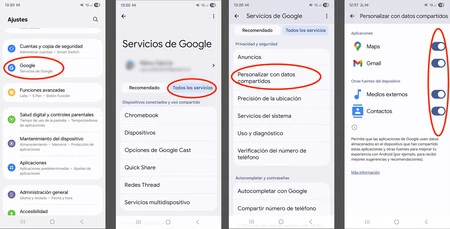
Empowering users to manage these background processes is crucial for optimizing device performance and safeguarding privacy. While specific menu paths may vary slightly between Android versions and device manufacturers (e.g., Samsung Galaxy vs. Pixel), the core principles and settings are universally applicable.
General Navigation Path:
Access these settings via Settings -> Apps (or Applications / App management). Select a specific app to review its permissions, battery usage, and data restrictions. Additionally, Google Account settings provide centralized control over data collection.
Key Areas to Review and Adjust:
-
Google Account Activity Controls: This is the most comprehensive starting point.
- Go to
myactivity.google.comorSettings->Google->Manage your Google Account->Data & privacy. - Web & App Activity: This logs your searches, browsing history, and interactions with Google apps and services. Pause this if you wish to prevent Google from storing this data.
- Location History: Records places you’ve been with your devices. Pause this to stop continuous location tracking and storage.
- YouTube History: Logs videos you watch and searches on YouTube. Pause if not needed for personalized recommendations.
- Voice & Audio Activity: Stores audio inputs from Google Assistant and other voice-activated services. Pause to prevent storage of your voice commands.
- Device Usage & Diagnostics: Disable sending diagnostic data and device usage information to Google.
- Go to
-
App-Specific Battery Optimization:
- Navigate to
Settings->Apps. - Select a problematic app (e.g.,
Maps,Gmail,Contacts,Google Photos,Google Play Services). - Tap on
Battery. - Choose a restriction option:
- Restricted/Deep sleeping apps (Samsung One UI): For apps you rarely use but don’t want to uninstall.
- Optimize battery usage/Unrestricted: Ensure most apps are optimized, but consider "Restricted" for those you suspect are draining battery excessively in the background.
- Background activity restriction: Explicitly prevent apps from running in the background. Be cautious with essential apps like messaging or email if you need instant notifications.
- Navigate to
-
App-Specific Mobile Data Restriction:
- Navigate to
Settings->Apps. - Select an app (e.g.,
Google Photos). - Tap on
Mobile data. - Disable
Allow background data usage. This prevents the app from using mobile data when not actively open, saving data plan and battery.
- Navigate to
-
App Permissions Review:
- Navigate to
Settings->Apps. - Select an app.
- Tap on
Permissions. - Review and revoke unnecessary permissions. For example:
- Does Google Maps need access to your
Contacts? Probably not for its core function. - Does a photo gallery app need
Locationaccess all the time, or only when you’re taking photos? - Limit
Locationaccess to "Allow only while using the app" for most applications.
- Does Google Maps need access to your
- Navigate to
-
Disable "Personalized Ads":
- Go to
Settings->Google->Ads. - Tap
Delete advertising IDto reset it, and then toggle offOpt out of Ads Personalization. This doesn’t stop ads entirely but makes them less targeted based on your activity.
- Go to
Broader Impact and Implications of User Configuration
Implementing these changes extends beyond mere technical adjustments; it has significant implications for individual users and potentially the broader digital ecosystem:
- Extended Device Longevity: By reducing unnecessary CPU cycles, network activity, and heat generation, users can significantly prolong the physical lifespan of their smartphone’s battery. Fewer charge cycles and less thermal stress mean the battery retains its capacity for a longer period, delaying the need for costly replacements or premature device upgrades. This also reduces wear and tear on other internal components sensitive to heat.
- Enhanced User Experience: A phone that maintains its charge throughout the day and doesn’t overheat during routine tasks offers a far more pleasant user experience. Users will experience less anxiety about battery life, faster performance due to fewer background processes competing for resources, and overall greater satisfaction with their device.
- Significant Data Savings: For users on limited mobile data plans, restricting background data usage for data-heavy apps can translate into substantial savings on monthly bills. This is particularly relevant for services like Google Photos which might upload large media files in the background.
- Empowerment of Digital Privacy: Perhaps the most critical implication is the regaining of control over personal data. By deactivating unwanted data collection features, users move from being passive data donors to active managers of their digital footprint. This fosters a greater sense of security and privacy, knowing that personal information is not being continuously harvested without explicit consent or clear benefit.
- Environmental Benefits: Extending the lifespan of electronic devices contributes to reducing electronic waste (e-waste). As smartphones become more durable and remain functional for longer, the demand for new devices might decrease, lessening the environmental impact associated with manufacturing, transportation, and disposal.
- Potential Industry Shift: A collective movement by users to configure these settings could send a clear signal to Google and other tech companies. Increased user demand for greater transparency, clearer "opt-in" privacy defaults, and less aggressive data collection could eventually influence future software design and policy, leading to a more privacy-centric digital environment.
In conclusion, while the allure of a seamlessly integrated digital life is strong, the hidden costs in terms of battery drain, device overheating, and compromised privacy are considerable. By understanding how default Google services operate in the background and by taking proactive steps to manage these settings, Android users can significantly improve their device’s performance, extend its lifespan, reduce operational costs, and, most importantly, assert greater control over their personal data in an increasingly interconnected world. This principle applies universally across all Android devices, irrespective of the specific manufacturer, underscoring the importance of informed user configuration.
