

All digital data and systems, from cloud platforms and personal accounts to company websites and mobile applications, are fundamentally hosted on real-world machines. The distinction between a "virtual server" and a "physical server" does not denote a difference in their existence but rather in their structural organization and operational methodology. This article delves into the characteristics, use cases, and comparative advantages of both physical and virtual servers, providing a comprehensive overview for businesses and IT professionals navigating the complexities of modern digital infrastructure.
What is a Physical Server?
A physical server, often referred to as a bare metal server, is a tangible piece of hardware. It comprises all the essential components of a computer system: a chassis, central processing unit (CPU), graphics processing unit (GPU), random-access memory (RAM), storage drives, a power supply unit, a network interface, an operating system, and server application software. These machines are engineered for continuous operation, typically running 24/7, and are dedicated to performing server-specific tasks such as hosting websites, managing databases, or providing network services.
The size and form factor of a physical server can vary significantly, from compact desktop units to large, rack-mounted systems. Regardless of its dimensions or location, a machine that possesses these dedicated hardware components and operates independently is classified as a physical server. Organizations can operate these servers privately within their own data centers or access them through major cloud providers.
Key Features of Physical Servers
The defining characteristic of a physical server is its exclusive dedication of all its computational resources to a single operating system and its applications. This exclusivity translates into enhanced security and potent performance capabilities. Key features include:
- Dedicated Resources: All processing power, memory, and storage are solely allocated to the tasks running on the physical server.
- Uncompromised Performance: With no sharing of resources, physical servers can deliver maximum, consistent performance for demanding applications.
- Enhanced Security: The isolated nature of physical servers can offer a higher degree of security by minimizing the attack surface and preventing interference from other tenants.
- Direct Hardware Access: Applications can directly interface with the hardware, which can be critical for specific high-performance computing or specialized hardware requirements.
- Full Control and Ownership: Organizations have complete control over the hardware, operating system, and software configurations.
Historical Context and Use Cases
In the early 2000s, the vast majority of digital infrastructure relied on physical servers. Each company typically hosted its own dedicated machines to power its IT systems, a model that was resource-intensive and often inefficient. While the landscape has shifted dramatically with the widespread adoption of virtualization, physical servers remain indispensable for specific, demanding workloads.
Popular use cases for physical servers include:
- High-Performance Computing (HPC): Applications requiring immense processing power, such as scientific simulations, complex data analysis, and financial modeling.
- Large-Scale Databases: Systems managing massive datasets where dedicated resources ensure optimal query performance and transaction speeds.
- Mission-Critical Applications: Software with stringent uptime and performance requirements, where any degradation could have significant business implications.
- Gaming Servers: Hosting online multiplayer games that demand low latency and high throughput.
- Workloads Requiring Specific Hardware: Applications that need direct access to specialized hardware, such as GPUs for machine learning training or specific network interface cards.
- Legacy Systems: Older applications that may not be compatible with virtualized environments.
Industries Reliant on Physical Servers
Sectors that prioritize extreme reliability, raw performance, robust security, and complete isolation often continue to leverage physical servers. These include:
- Financial Services: For high-frequency trading platforms and core banking systems where milliseconds matter and security is paramount.
- Healthcare: For managing sensitive patient data and critical medical imaging systems requiring guaranteed performance and strict compliance.
- Government and Defense: For classified systems, secure communication networks, and critical infrastructure control where absolute isolation and security are non-negotiable.
- Aerospace: For complex design simulations and control systems that demand the highest levels of computational power and precision.
- Manufacturing: For real-time control systems in industrial automation and large-scale production planning.
- Media and Entertainment: For intensive video rendering, special effects processing, and large-scale content delivery networks where performance is key to meeting deadlines.
What is a Virtual Server?
A virtual server, also known as a virtual machine (VM), is a software-based emulation of a physical server. It is created by partitioning the resources of a single physical server into multiple isolated virtual environments. This process, known as virtualization, is the cornerstone of modern cloud computing, enabling cloud providers to offer scalable and efficient computing resources by maximizing the utilization of their underlying hardware.
Imagine a powerful, state-of-the-art physical server equipped with substantial computing power, vast storage, high speed, and robust reliability. Through virtualization software (a hypervisor), this single physical machine can be logically divided to host numerous virtual servers. Each virtual server, or VM, is then allocated a dedicated slice of the physical server’s resources—CPU, RAM, and storage—and operates as an independent, isolated system. This multi-tenancy model is what allows cloud giants to serve millions of users and businesses concurrently from a shared physical infrastructure.
Key Features of Virtual Servers
Virtual servers offer a distinct set of advantages, primarily centered around flexibility, scalability, and cost-efficiency. Key features include:
- Resource Sharing and Efficiency: Multiple virtual servers run on a single physical machine, leading to higher hardware utilization and reduced energy consumption.
- Scalability and Elasticity: Resources can be easily scaled up or down for individual VMs as demand fluctuates, allowing for rapid adaptation to changing business needs.
- Rapid Deployment and Provisioning: New virtual servers can be created, configured, and deployed in minutes, significantly reducing deployment times compared to physical hardware.
- Isolation and Security: While sharing hardware, VMs are logically isolated from each other, providing a level of security and preventing issues on one VM from affecting others.
- Portability and Migration: Virtual servers can be easily moved or copied between physical hosts, facilitating maintenance, load balancing, and disaster recovery.
- Cost-Effectiveness: Reduced hardware acquisition, maintenance, and operational costs make virtual servers an attractive option, especially at scale.
Evolution and Use Cases
The proliferation of virtual servers has fundamentally reshaped the IT landscape. The ability to dynamically provision and manage computing resources has fueled the growth of cloud computing services, enabling businesses of all sizes to access powerful IT infrastructure without the capital investment in physical hardware.
The use cases for virtual servers are virtually limitless and span across all industries:

- Web Hosting: Powering websites and web applications of all sizes, from small blogs to large e-commerce platforms.
- Application Development and Testing: Providing isolated environments for developers to build, test, and debug applications without impacting production systems.
- Database Management: Hosting databases for applications, ensuring data availability and performance.
- Email Servers: Managing email services for organizations.
- File Servers: Storing and sharing files within a network.
- Virtual Desktop Infrastructure (VDI): Delivering virtualized desktop environments to users, allowing them to access their work environment from any device.
- Cloud Computing: Forming the backbone of Infrastructure as a Service (IaaS), Platform as a Service (PaaS), and Software as a Service (SaaS) offerings.
- Disaster Recovery and Business Continuity: Enabling quick recovery of services by replicating VMs to secondary sites.
- Machine Learning and AI: Running training and inference workloads that can be scaled dynamically.
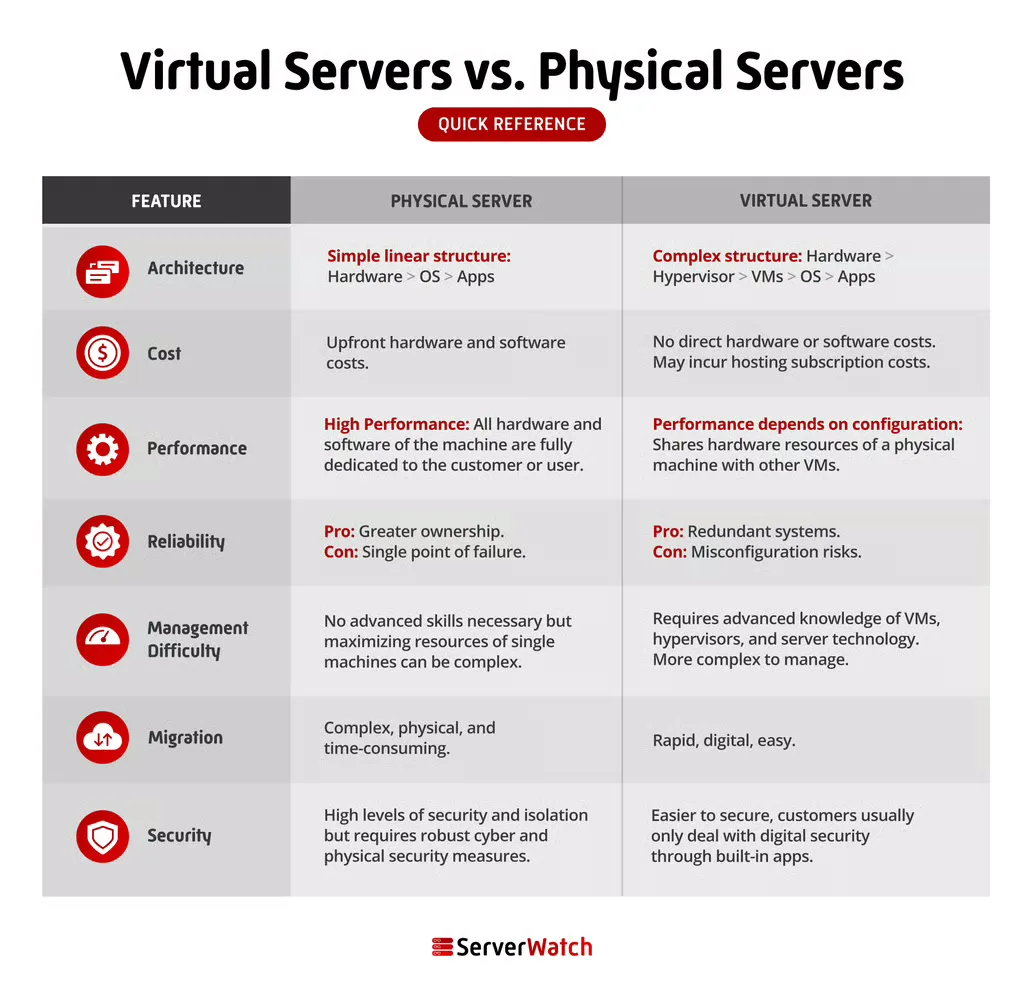
Virtual Servers vs. Physical Servers: A Comparative Analysis
The choice between physical and virtual servers hinges on a nuanced understanding of their differences across several critical dimensions.
Architecture
The fundamental distinction lies in their architectural design. A physical server is a singular, dedicated hardware unit with all its resources committed to its operation. In contrast, a virtual server is a software construct that abstracts and partitions the resources of one or more physical servers. This abstraction is managed by a hypervisor, which allows multiple VMs to coexist on a single piece of hardware.
Cost
While the initial complexity of virtualization technology might suggest higher costs, the reality is that virtual servers, when deployed at scale, are significantly more cost-efficient. This stems from several factors:
- Hardware Consolidation: Fewer physical servers are needed to achieve the same or greater computing capacity, leading to reduced hardware purchase costs.
- Reduced Operational Expenses: Lower power consumption, cooling requirements, and data center space translate into substantial savings.
- Maintenance Outsourcing: For cloud-based virtual servers, users are typically not responsible for hardware maintenance, repairs, or replacements. This offloads significant costs and management overhead.
- Elimination of Physical Risks: Users of cloud virtualization vendors are insulated from the costs and disruptions associated with physical hardware failures, theft, or environmental disasters like fires or floods.
Physical servers, on the other hand, involve higher upfront hardware costs, ongoing power and cooling expenses, and direct responsibility for maintenance and potential replacements.
Performance
The performance comparison between physical and virtual servers is often nuanced and depends heavily on the specific workload and configuration.
- Physical Servers: Generally offer predictable and consistent peak performance because they have exclusive access to all hardware resources. This makes them ideal for latency-sensitive applications or those requiring raw, unadulterated processing power.
- Virtual Servers: Performance can be highly efficient, but it can also be subject to variations due to resource contention if the underlying physical server is oversubscribed or if other VMs on the same host are experiencing heavy loads. However, modern virtualization technologies and advanced resource management techniques have significantly closed this performance gap. For many common workloads, the performance difference is negligible, and the flexibility of VMs outweighs minor potential performance fluctuations. For workloads demanding absolute maximum performance without any compromise, physical servers may still hold an edge.
Reliability
Both physical and virtual servers can be configured for high reliability, but the mechanisms and implications differ.
- Physical Servers: Reliability is achieved through redundant hardware components (e.g., dual power supplies, RAID storage), robust cooling, and careful physical maintenance. Failures in a physical server can lead to complete downtime for all services hosted on it.
- Virtual Servers: Reliability is enhanced through virtualization features like live migration (moving a running VM from one host to another without downtime), high availability clustering (automatically restarting VMs on a different host if their current host fails), and snapshots for quick recovery. Cloud providers invest heavily in redundant infrastructure, making their virtualized environments exceptionally reliable, often exceeding the reliability achievable by an individual organization with its own physical servers.
Management Difficulty
The complexity of server management varies, but the outsourcing model of virtual servers often simplifies the burden for businesses.
- Physical Servers: Require comprehensive in-house expertise for hardware installation, operating system configuration, patching, monitoring, troubleshooting, and physical maintenance. This demands a dedicated IT team with specialized skills.
- Virtual Servers: While the underlying virtualization technology requires skilled administrators, for users of cloud-based virtual servers, much of the hardware and hypervisor management is handled by the provider. This shifts the focus for the user towards managing the operating system and applications within the VM, significantly reducing the overall management overhead.
Migration
Migrating virtual servers is considerably easier and faster than migrating physical servers.
- Virtual Servers: Can be copied, cloned, or moved between physical hosts with relative ease, often requiring just a few clicks through management interfaces. This facilitates upgrades, data center moves, or load balancing with minimal disruption.
- Physical Servers: Migration involves physically moving the hardware, reconfiguring network settings, and often performing a complete system backup and restore to a new machine. This process is time-consuming, labor-intensive, and carries a higher risk of error or downtime.
Security
Both physical and virtual servers can be secured effectively, but the approaches and considerations differ.
- Physical Servers: Offer a high degree of isolation by default, as they are not shared with other tenants. Security efforts focus on physical security of the data center, network security, operating system hardening, and application-level security.
- Virtual Servers: While VMs are logically isolated, they reside on shared physical hardware. Security requires robust hypervisor security, strong network segmentation between VMs, and diligent patching and hardening of both the host and guest operating systems. Cloud providers invest heavily in securing their underlying infrastructure, but organizations must still implement proper security controls within their virtual environments. The ease of snapshotting and cloning VMs also aids in security by enabling quick rollbacks to known good states.
The Bottom Line: Choosing the Right Server for Your Business
The decision between physical and virtual servers is not a one-size-fits-all proposition. It requires a thorough assessment of a business’s unique operational requirements, budget, technical expertise, and strategic goals.
Virtual servers are an excellent choice for the majority of businesses due to their inherent affordability, remarkable scalability, and access to cutting-edge technologies managed by cloud providers. They empower organizations to be agile, respond quickly to market changes, and optimize IT spending. Their flexibility makes them ideal for dynamic workloads, development environments, and applications that benefit from rapid provisioning and scaling.
However, physical servers retain their relevance for specific scenarios. Businesses that demand the absolute highest levels of raw performance, require complete ownership and control over their hardware, or operate under extremely stringent regulatory compliance mandates that necessitate physical isolation might find physical servers to be the more suitable option. These might include organizations with highly proprietary data, specialized hardware dependencies, or applications that are exceptionally sensitive to the minute performance variations that can occur in a shared virtualized environment.
Ultimately, a hybrid approach, leveraging both physical and virtual servers to meet diverse needs, is also a common and effective strategy for many modern enterprises. By understanding the distinct strengths and weaknesses of each, businesses can architect an IT infrastructure that is both powerful and cost-effective, positioning them for success in the digital age.
